Multi-Branch Retail Networks in Kuwait: FortiGate, POS Segmentation and Central CCTV
How a retail chain in Kuwait should connect its branches: a FortiGate firewall per site with encrypted tunnels to head office, POS and CCTV on separate VLANs, cloud-managed Wi-Fi, and camera storage sized for the 120-day legal retention.
Short answer
How should a retail chain in Kuwait connect and secure its branch networks?
UltraTech Kuwait builds multi-branch retail networks as one system rather than separate shop networks. Each branch gets a FortiGate firewall with an encrypted tunnel to head office and optional 5G failover, traffic is split into VLANs so POS terminals never share a network with guest Wi-Fi or cameras, Wi-Fi runs on cloud-managed Ruijie Reyee access points, and each branch keeps a local NVR sized for 120-day retention with a central view at head office.
Key points
- One network across all branches, not one network per shop
- A FortiGate at every branch, not only at head office
- POS terminals belong on their own VLAN, away from guest Wi-Fi and cameras
- A 5G backup link keeps a branch trading during an outage
- Camera storage must be sized for 120 days under Law 61/2015
- One standard build makes every new branch a repeat, not a project
In this article
- The short answer
- Why most multi-branch retail networks in Kuwait are built wrong
- The design that fixes it
- 1. A FortiGate at every branch, tunnelled to head office
- 2. Segmentation: one connection, several separate networks
- 3. Wi-Fi that is designed, not accumulated
- 4. CCTV that satisfies Law 61/2015
- 5. One standard build, repeated
- What to ask before you sign anything
- How UltraTech delivers it
The short answer
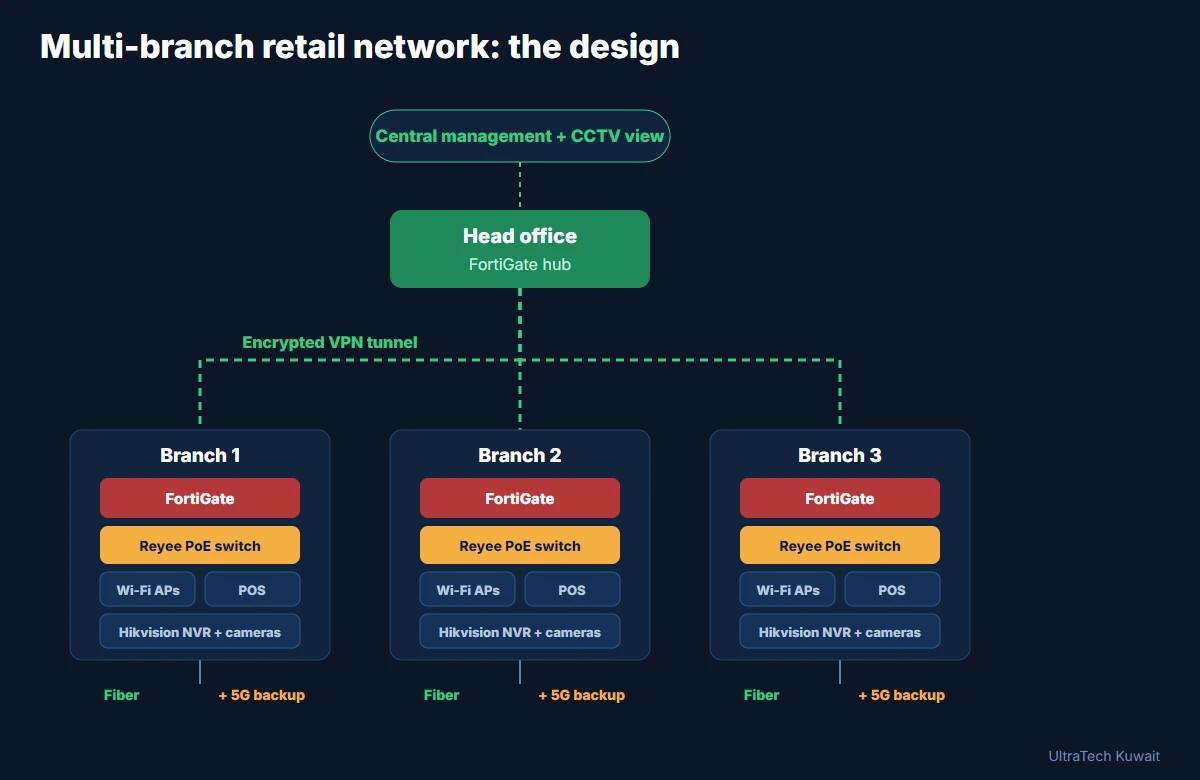
A retail chain in Kuwait should run one network across all branches, not one network per branch. In practice that means a FortiGate firewall at every site joined by encrypted VPN tunnels to head office, separate VLANs for POS, back office, CCTV and guest Wi-Fi, a PoE switch and access points per branch, and CCTV retained for 120 days as Kuwait's Law 61/2015 requires. Built this way, opening branch six is a repeat of branch one instead of a new project.
Why most multi-branch retail networks in Kuwait are built wrong
Chains rarely plan a network. They open a shop, the ISP installs a router, someone plugs in the POS, and cameras are added later by a different contractor. Repeat that five times and you have five unrelated networks. The symptoms are always the same:
- Card payments are slow or drop at busy times, because the POS terminal shares one flat network with staff phones, guest Wi-Fi and a wall of cameras uploading footage.
- Nobody can see the other branches. Head office phones the branch manager to ask what the stock system says, and reviewing camera footage means driving there.
- Every branch is configured differently, so every fault is a fresh investigation and no one knows which password belongs to which site.
- Guest Wi-Fi sits on the same network as the tills. A customer's infected laptop is one hop from the payment terminals.
- There is no failover. When the line to one branch goes down, that branch stops trading.
The design that fixes it
1. A FortiGate at every branch, tunnelled to head office
Each site gets its own FortiGate firewall, and each one builds an encrypted IPsec tunnel back to a FortiGate hub at head office. Head office becomes the centre of a private network: stock systems, reporting and camera access all travel inside the tunnels instead of across the open internet.
With SD-WAN on the same devices, each branch can hold two internet connections — a fixed line plus a 5G backup — and switch over automatically when one fails. A branch that keeps trading through an outage pays for that firewall quickly. We covered the economics of 5G links in our 5G business internet case study.
2. Segmentation: one connection, several separate networks
This is the part that matters most and the part most often skipped.
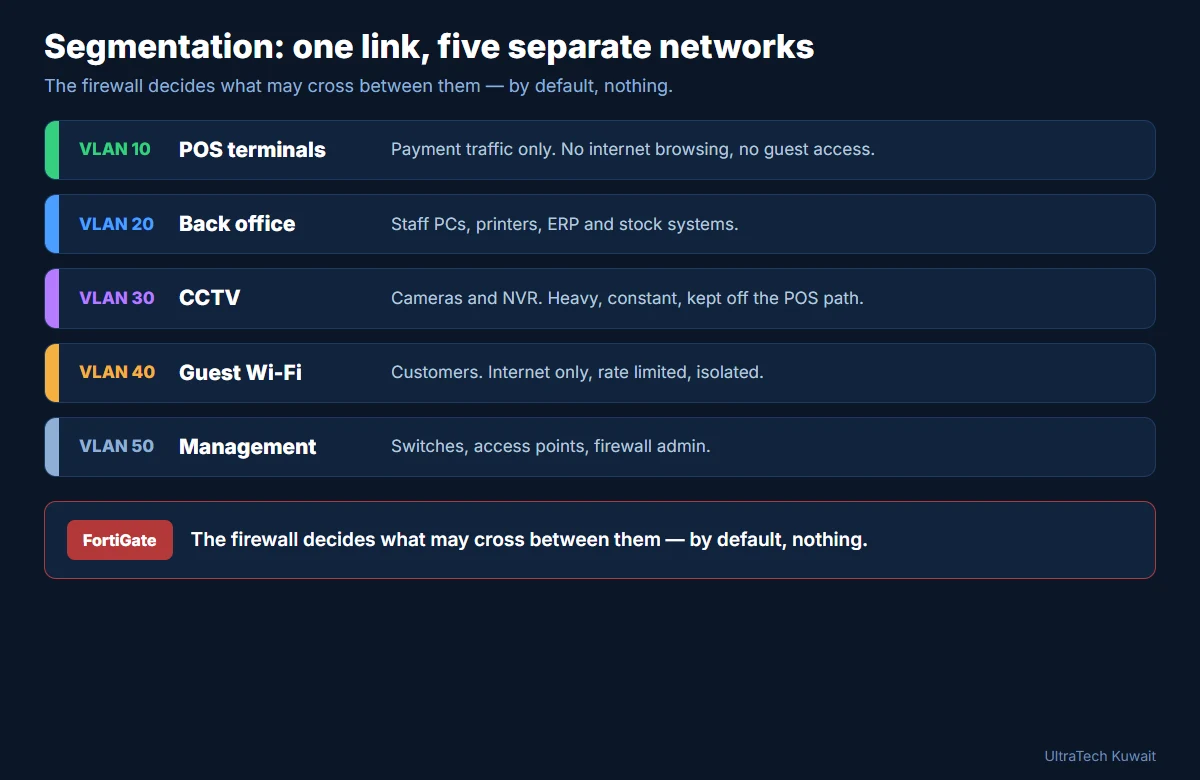
| VLAN | Carries | Rule |
|---|---|---|
| 10 | POS terminals | Payment traffic only; no browsing, no guest access |
| 20 | Back office | Staff PCs, printers, ERP and stock |
| 30 | CCTV | Cameras and NVR; heavy and constant, kept off the POS path |
| 40 | Guest Wi-Fi | Internet only, speed limited, fully isolated |
| 50 | Management | Switches, access points, firewall administration |
The firewall decides what may pass between these networks and, by default, nothing does. Guest Wi-Fi cannot reach a till. A compromised camera cannot reach the back office. Camera uploads cannot slow down a payment.
This is also the honest answer to a question we are asked often: putting POS terminals on their own segmented network is a basic requirement of card-payment security, not an optional extra.
3. Wi-Fi that is designed, not accumulated
Each branch gets a PoE switch and the right number of Ruijie Reyee access points, powered over their network cables so there are no adapters behind the counter. Two wireless networks are published: a staff one joined to the back-office VLAN, and a guest one that only reaches the internet. Because the access points are cloud managed, head office sees every branch's Wi-Fi in one dashboard and we can support it without a site visit.
4. CCTV that satisfies Law 61/2015
Kuwait's Law No. 61 of 2015 requires named categories of premises — including shopping malls, co-operative societies, gold and jewellery shops, and storage facilities — to run approved surveillance systems, keep recordings for 120 days, maintain the equipment, and display signs stating cameras are in use. Penalties for installation and maintenance breaches reach KD 1,000 to 5,000.
For a chain this drives three decisions: an NVR at each branch sized for 120 days of storage rather than 30, cameras on their own VLAN so retention never competes with trading traffic, and a central Hikvision view at head office so footage can be pulled without travelling. Our CCTV installation guide covers camera placement, and the CCTV storage calculator works out how much disk 120 days actually needs.
5. One standard build, repeated
The commercial argument for doing all of this is repeatability. When every branch uses the same firewall model, the same switch, the same access points and the same VLAN numbering, a new branch is a configuration copy rather than a design exercise. Openings get faster, spares cover every site, and any technician can work on any branch.
What to ask before you sign anything
- Will each branch have its own firewall, or is head office the only protected site?
- Are POS terminals on a separate network from guest Wi-Fi and cameras? Ask to see it, not just to be told.
- Is there a second internet connection at branches that cannot afford to stop trading?
- Is camera storage sized for 120 days at the resolution actually being recorded?
- Can head office see all branches — network and cameras — without a site visit?
- Is the build documented and identical across branches, and do you hold the admin passwords?
How UltraTech delivers it
We survey each branch, agree one standard build, and roll it out branch by branch so trading is not interrupted — typically outside opening hours. You get the documentation, the credentials and a single point of contact for the firewalls, the switches, the Wi-Fi and the cameras, rather than four contractors blaming each other.
If you run a chain of shops, restaurants, pharmacies or showrooms in Kuwait, talk to UltraTech Kuwait about a branch network survey. See also our firewall and cybersecurity services and our network solutions.
Engineer's note
The fault we see most often in Kuwait retail is a flat network: tills, cameras, staff devices and customer Wi-Fi all sharing one router. It works until the chain grows, then every branch becomes its own unsupportable design. Standardising on one firewall, one switch and one VLAN scheme across all branches costs less per site than repeatedly troubleshooting five different ones.
Sources
Book a Site Survey
Our engineers assess your site; the visit fee is deducted if you go ahead.
Book SurveyQuestions people ask
Why should POS terminals be on a separate network?
Because payment devices should not share a network with guest Wi-Fi, staff devices or cameras. Segmenting POS onto its own VLAN behind the firewall protects payment traffic from other devices and stops heavy traffic such as camera uploads from slowing transactions.
Do I need a firewall at every branch or only at head office?
At every branch. A firewall only at head office leaves each shop exposed and provides no secure path between sites. A FortiGate per branch gives local protection, segmentation and an encrypted tunnel back to head office.
How long must CCTV footage be kept in Kuwait?
Under Law No. 61 of 2015, covered premises must retain recordings for 120 days, keep systems maintained and display signage. Storage at each branch must be sized for 120 days at the resolution you actually record.
Can head office view all branch cameras from one place?
Yes. Each branch keeps a local NVR for recording and retention, while the encrypted tunnels let head office view any branch centrally, without travelling to the site.
What happens when a branch loses its internet connection?
With SD-WAN on the branch FortiGate and a second connection such as 5G, traffic switches automatically to the backup link and the branch keeps trading. Without it, that branch stops until the line is restored.
Can this be rolled out without closing the shops?
Yes. We survey each branch, agree one standard build and install branch by branch, normally outside trading hours, so each site is cut over in a single planned window.
Planning something similar?
Send us the floor plan or a few photos on WhatsApp. An engineer replies with what the job needs and what it involves.
Read next
All articles- Business Software
How Much Does an ERP System Cost in Kuwait? What Actually Drives the Price
ERP cost in Kuwait is driven by four factors: which modules you need (accounting only vs. accounting + inventory + HR), how many users, how much customization your workflows require, and where it is hosted. A configured implementation for a small business costs far less than a custom multi-branch build. Two costs are routinely under-quoted: data migration from Excel or legacy systems, and staff training — insist both appear in any quote you compare.
26 Aug 2026 · 3 min readRead - CCTV Systems
How to Choose the Right Hikvision NVR: 16, 32, 64 or 128 Channels?
Choose a Hikvision NVR by four criteria: channel count with at least 20% headroom for future cameras, enough HDD bays to meet your retention target (120 days for commercial sites in Kuwait), decoding capability that matches how many screens you monitor, and RAID support if losing footage is not acceptable. A 16–32 channel DS-7700/DS-8600 series fits most SMEs; multi-building or industrial sites step up to 64–256 channel DS-9600/DS-96000 series with RAID.
17 Aug 2026 · 2 min readRead - CCTV Systems
How Much Does CCTV Installation Cost in Kuwait? (2026 Guide)
CCTV installation cost in Kuwait depends on five factors: how many cameras and what grade, cabling distance and difficulty, NVR and storage sized for the 120-day retention requirement, installation complexity, and whether ongoing maintenance is included. A small shop system costs a fraction of a multi-floor company installation — the reliable way to know your price is a site survey followed by a fixed, itemized quote.
6 Aug 2026 · 3 min readRead