Wi-Fi Connected but No Internet? How We Fixed a 7-Router Home Network in Kuwait
A Kuwait homeowner kept losing internet despite a strong Wi-Fi signal and an upgrade to Zain Ultra 5G. UltraTech traced the fault to seven TP-Link Archer AX23 routers running conflicting DHCP services and restored normal connectivity in two hours without replacing them.
The job in short
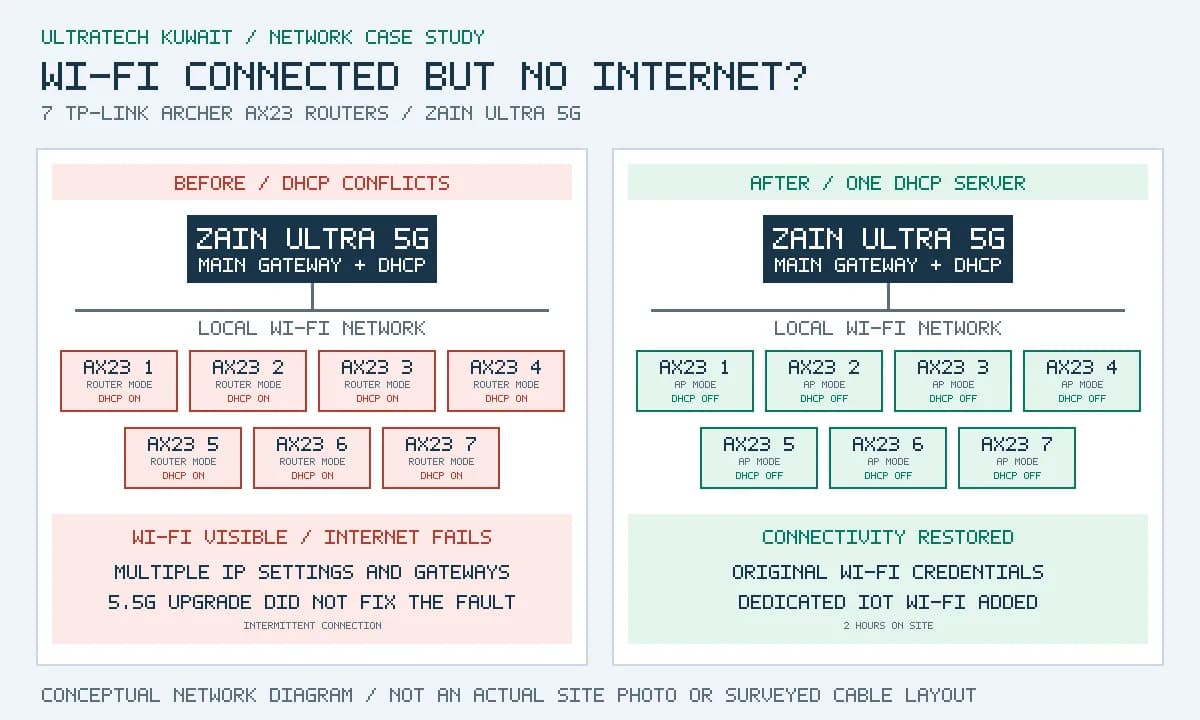
A Kuwait homeowner experienced intermittent Wi-Fi with no internet despite upgrading her Zain 5G router to Ultra 5G. UltraTech diagnosed seven TP-Link Archer AX23 routers with competing DHCP servers. With permission, technicians reset and switched all seven to AP mode, leaving the Zain router as the DHCP authority, restored the original SSID/password and configured a separate IoT Wi-Fi name. Normal connectivity returned during the two-hour site repair; no new equipment was required.
- Existing routers reconfigured
- 7
- Site visit arranged within
- 3 hours
- On-site repair
- 2 hours
- Replacement devices required
- 0
At a glance
- Property
- Residential house
- Client
- Residential
- Time on site
- 2 hours on site
Equipment brands
 TP-Link
Before and after
| Before | After |
|---|---|
| Wi-Fi visible, internet randomly unavailable | Normal internet access restored during site visit |
| Seven secondary routers with their own DHCP services | One main DHCP authority; seven access points |
| New 5.5G router did not solve the problem | Existing equipment retained; underlying configuration corrected |
| Existing household Wi-Fi | Original credentials restored plus dedicated IoT Wi-Fi |
The problem
The homeowner had a frustrating problem: the Wi-Fi network name was always visible, and devices could connect, but internet access would randomly stop working and then return. The house relied on a Zain 5G router and seven TP-Link Archer AX23 Wi-Fi 6 routers distributed throughout the property. Believing the mobile broadband connection was at fault, she upgraded to a newer Zain Ultra 5G (5.5G) router. The same intermittent problem continued.
After finding UltraTech, a specialist IT and network troubleshooting company in Kuwait, she shared photographs and a video showing the problem. Our technical team responded within moments and arranged a site visit within three hours. A senior network technician attended with the team. After listening to the client and inspecting the setup, we identified that the main Zain router was functioning correctly. The seven secondary routers were still operating with their own DHCP servers active.
On a shared network, competing DHCP servers can supply different IP settings, default gateways or DNS information. A phone may still show a strong Wi-Fi connection while being unable to reach the internet. That explains why upgrading the internet router had made no difference.
What we did
Rather than sell the client another router or replace seven functioning devices, we corrected the underlying network configuration. With her permission, we factory-reset all seven TP-Link Archer AX23 units, configured them in their supported Access Point (AP) mode and ensured their independent DHCP services were disabled. The Zain router remained the main gateway and DHCP authority; the AX23 units were used to distribute Wi-Fi rather than operate as competing routers.
We restored the original Wi-Fi network name and password so the household could continue using familiar credentials. We also set up a dedicated Wi-Fi network for the home's IoT and smart devices. A separate Wi-Fi name is useful for device management, although it does not by itself imply VLAN or firewall isolation.
The on-site remediation was completed within two hours. TP-Link officially documents AP mode for the Archer AX23, making it possible to reuse the existing hardware instead of buying a replacement Wi-Fi system. Manufacturer reference: https://www.tp-link.com/ae/home-networking/wifi-router/archer-ax23/ and https://www.tp-link.com/us/support/faq/1384/.
The result
Normal internet and Wi-Fi operation was restored during the visit. The homeowner retained her Zain Ultra 5G connection, all seven existing AX23 units, and her original Wi-Fi credentials, with an additional dedicated IoT Wi-Fi network. No replacement networking equipment was needed for the reported fault.
The lesson is simple: when Wi-Fi is connected but internet access intermittently disappears, the ISP or signal strength is not always to blame. A professional network diagnosis can uncover local IP addressing and gateway problems before money is spent on unnecessary upgrades. UltraTech provides home Wi-Fi troubleshooting, router configuration and network diagnostics in Kuwait. Contact our team to arrange a site visit for similar connectivity issues.
Equipment used on this job
What we installed, how many, and what each device does here.
- 1×Zain Ultra 5G (5.5G) router — Retained as the main internet gateway and DHCP server.
- 7×TP-Link Archer AX23 AX1800 Wi-Fi 6 routers — Existing units reset and configured in AP mode; independent DHCP disabled.
What other owners can learn from this job
- 1A strong Wi-Fi signal does not guarantee internet access.
- 2A faster 5G router cannot fix conflicting DHCP settings on the local network.
- 3Existing routers that support AP mode can often be reused to distribute Wi-Fi.
- 4Diagnose the root cause before buying replacement hardware.
Questions the customer asked
Why is my Wi-Fi connected but there is no internet in Kuwait?
Possible causes include ISP outages, incorrect DNS or gateway settings and competing DHCP servers. In this project, multiple local DHCP servers caused intermittent connectivity.
Can TP-Link Archer AX23 be used as an access point?
Yes. TP-Link documents Access Point mode for the Archer AX23. A correctly configured main router can then supply IP settings to the network.
Will upgrading my Zain 5G router fix intermittent Wi-Fi?
Not if the underlying fault is inside the home network. Diagnose DHCP, gateway, DNS and access point configuration first.
Do I need to replace all my home Wi-Fi routers?
Not necessarily. Compatible equipment can often be reconfigured. In this case all seven AX23 routers were retained.
Planning something similar?
Send us the floor plan or a few photos on WhatsApp. An engineer replies with what the job needs and what it involves.
More projects
All projects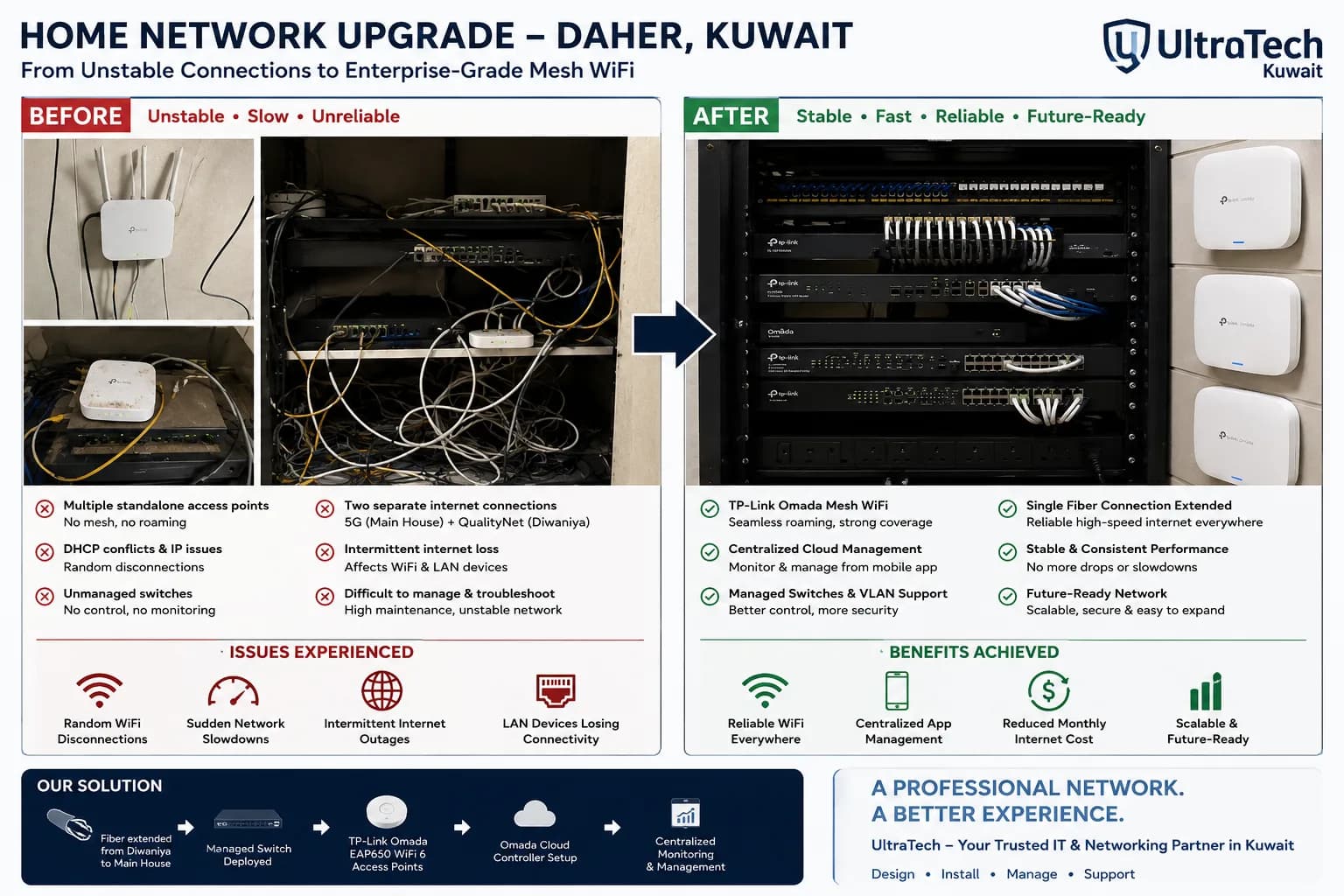 Project record Daher
Enterprise-Grade Omada Mesh Network for a Two-Building Property in Daher
A homeowner in Daher suffered constant Wi-Fi drops and outages across 7–8 standalone access points. UltraTech rebuilt the network around TP-Link Omada with a wired backbone unifying the main house and Diwaniya on one managed system.
- 2 Buildings unified
- 7+ Old APs replaced
- Wi-Fi 6 Wi-Fi standard
- 1 Controller
1 Jun 2026Read- Project record Sabah Al-Ahmad
New Villa in Sabah Al-Ahmad: Wi-Fi, Cameras and Intercom Planned Before Plaster
A newly built villa in Sabah Al-Ahmad, cabled by the owner's electricians to our network plan while the house was still under construction, then fitted by UltraTech with whole-house Wi-Fi 6, outdoor cameras and a two-door video intercom on one network.
- 14 Wi-Fi 6 access points
- 5 Outdoor cameras
- 2 Doors on the intercom
- 6 Indoor monitors
29 Aug 2026Read - Project record Al-Siddiq
Villa in Al-Siddiq: Wi-Fi, Cameras and a Custom Two-Door Intercom in 2 Days
A villa in Al-Siddiq in its final finishing stage, surveyed, quoted and then fitted in two days with seven Wi-Fi 6 wall access points, five outdoor cameras and a custom Akuvox intercom where each of the two doors rings its own profile.
- 7 Wi-Fi 6 access points
- 5 Outdoor cameras
- 2 Doors, each with its own profile
- 2 days Installation
15 Oct 2026Read