Network operations in Kuwait
Someone watching the network, fixing it when it breaks, and writing down how it works.
Network operations is the work of keeping a business network healthy after it is installed: monitoring switches, Wi-Fi, firewalls and internet lines, finding the cause of faults, and keeping drawings, IP plans and passwords up to date. UltraTech Kuwait runs network operations for businesses across Kuwait, monthly under a maintenance contract or as a one-off health check or call-out, including networks another company installed.
Reviewed by Eng. M. Ahmed, Team Leader, Network & Project Specialist · Updated
Key facts
- Covers
- Monitoring, health checks and audits, on-site troubleshooting, documentation and labelling
- Approach
- Remote first; an engineer on site when the fault cannot be fixed remotely
- Findings
- A written report: what is wrong, why, and what to fix first
- Take-overs
- Networks installed by others documented and brought under management
- Terms
- Monthly under a maintenance contract, or one-off visits
- Coverage
- All six governorates of Kuwait
Network operations services
Four services for a network that is already running. Each is quoted on request; the monthly option is a maintenance contract.
Network monitoring & management
Have someone watch the network
Switches, Wi-Fi, firewall and internet lines watched, so problems are seen before staff notice.
- Alerts for a line, switch or access point going down
- Firmware and configuration backups kept current
- Changes made and recorded on request
- A short monthly summary
Network health check & audit
Find out what is wrong and why
An engineer measures the internet, switches, Wi-Fi and firewall and writes down what is causing the trouble.
- Speed, errors and loops measured end to end
- End-of-life equipment and firmware listed
- Security settings reviewed
- A prioritised list of fixes with costs
On-site network troubleshooting
Fix a slow or failing network
Slow, dropping or down: an engineer finds the cause on site and fixes it.
- Internet, switch, Wi-Fi and cabling checked in order
- Cable faults found with a tester
- Fixes made on the visit where possible
- A note of what was found and changed
Network documentation & labelling
Document a network nobody understands
Drawings, IP plan and labels for a network that grew without a plan, so anyone can work on it.
- Every switch, port and device mapped
- Admin access recovered where it was lost
- Outlets and patch panels labelled
- Drawings and passwords handed to you
What we look after
A slow network can be any part of the path between a device and the internet. Operations covers every part, in the order a fault is usually found.
- 1
Internet lines
Line speed, failover and the provider's equipment; faults raised with the provider for you.
- 2
Firewall
Firmware, rules, VPN users and security alerts.
- 3
Switches
Port errors, loops, PoE load and VLAN settings.
- 4
Wi-Fi
Coverage, channels, overloaded access points and guest isolation.
- 5
Cabling and racks
Faulty runs, untraceable patching and overheating cabinets.
- 6
Contract cover
The whole site under one monthly maintenance contract, with computers, printers and CCTV.
Networks we support
We support the equipment you already have, whoever installed it, and recover admin access where it was lost.
Ubiquiti UniFi
UniFi gateway, switches and Wi-Fi
Controller, firmware, Wi-Fi and backups
TP-Link Omada
Omada router, switches and Wi-Fi
Controller, VLANs and guest network
Ruijie Reyee
Cloud-managed shops and clinics
Cloud app, Wi-Fi and switches
Aruba and Cisco
Larger offices and enterprises
Switch configuration and Wi-Fi
Fortinet FortiGate
Firewall, SD-WAN and VPN
Rules, firmware, VPN users and alerts
MikroTik
Routing and multi-line setups
Routing, failover and backups
Recent network work in Kuwait
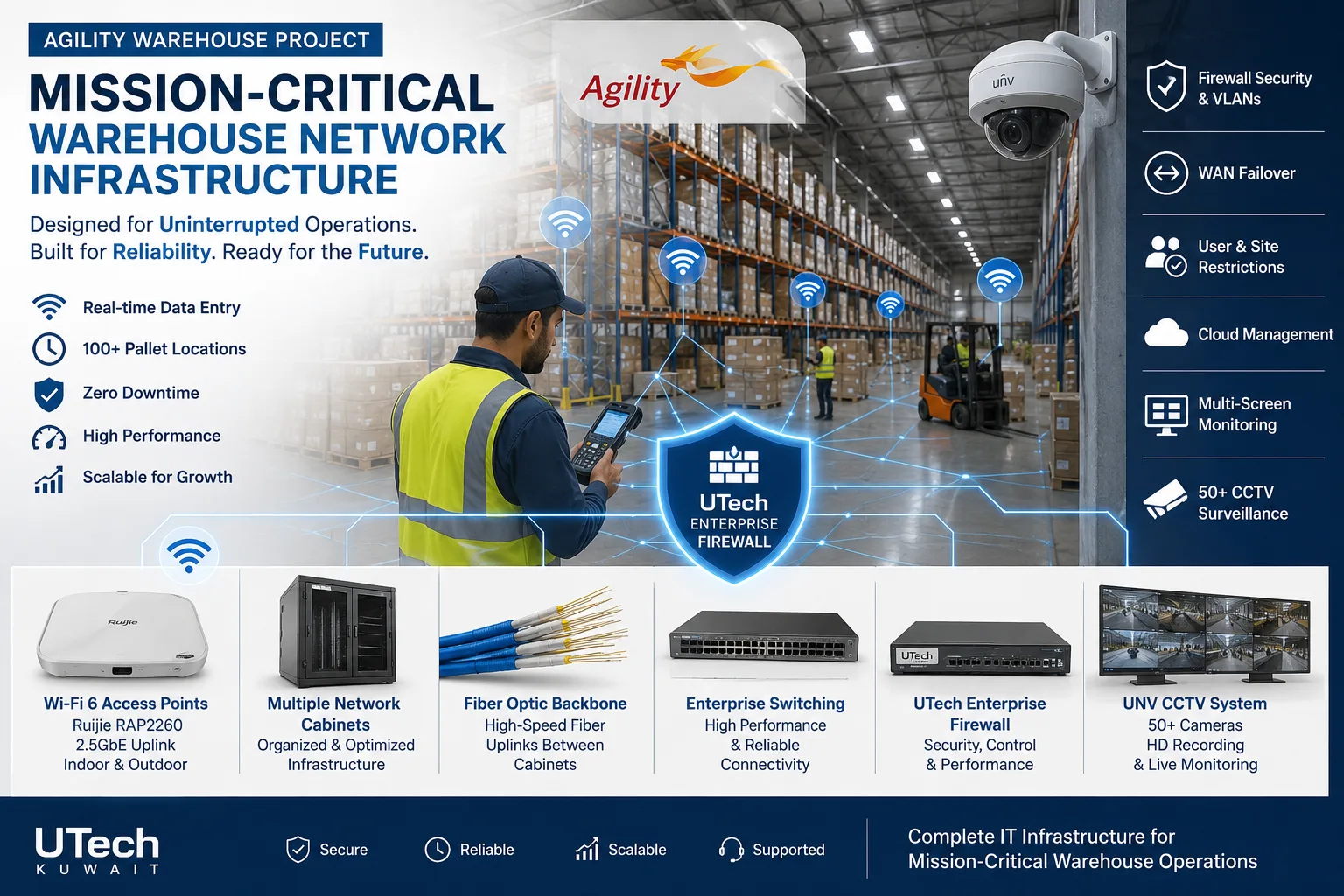 Mission-critical warehouse networkEnterprise Wi-Fi and switching for a major logistics operator's warehouse in Kuwait.Read the case study
 Multi-floor commercial Wi-Fi upgradeEnterprise Wi-Fi rebuilt across every floor of a commercial facility.Read the case study
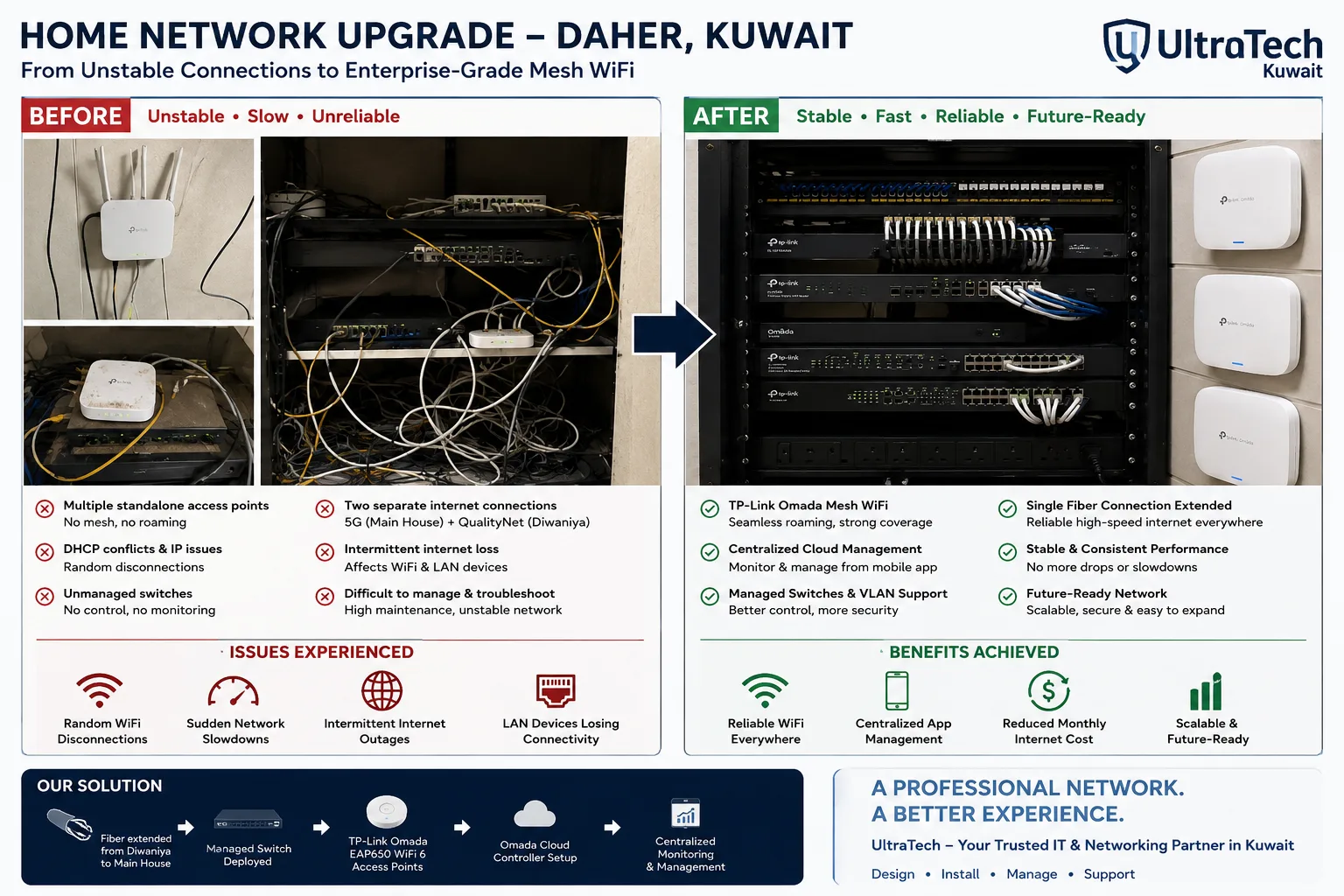 Two-building Omada mesh network, Daher7–8 unstable access points replaced by one managed Omada network across two buildings.Read the case study
How we take over a network
- 1
Health check
We measure the network and list what is failing, what is end of life and what is unsafe.
- 2
Document
Drawings, IP plan, labels and admin access, recovered where they were lost.
- 3
Fix
Urgent fixes first, the rest in the agreed order, after hours where needed.
- 4
Look after
Monitoring and support monthly under a contract, or a call-out when you need one.
What you receive:Written health-check reportNetwork drawingIP and VLAN planLabelled ports and outletsConfiguration backupsAdmin access and passwords
More explanation
Why a business network slows down
- A loop in the cabling
- One cable plugged into two sockets can flood the network and make everything crawl. Managed switches detect and block it; unmanaged ones do not.
- An overloaded access point
- Coverage is fine but too many people share one access point. The fix is placement, not a stronger signal.
- A 100 Mbps link in the path
- An old switch, a damaged cable or a port negotiating at the wrong speed caps everything behind it.
- The internet line, not the network
- A line running at a fraction of its speed looks like a network fault. Measuring at the firewall tells the two apart.
- Firmware nobody updated
- Old firmware brings known bugs and security holes. Updates are planned and tested, not left to chance.
Taking over a network nobody documented
- Find every device
- We scan the network and walk the site to list each switch, access point, firewall and what is plugged into them.
- Recover admin access
- Lost passwords are reset with care, so settings are kept rather than wiped.
- Write it down
- A drawing, an IP plan and a port map, then labels on outlets and patch panels to match.
- Back up the settings
- Every device's configuration is saved, so a failed unit can be replaced and restored the same day.
What a network health check measures
| Area | What we check | Common finding |
|---|---|---|
| Internet | Speed both ways, failover, provider equipment | Line slower than paid for; no backup |
| Firewall | Firmware, rules, VPN users, open ports | Old firmware, ports left open |
| Switches | Port errors, loops, PoE load, VLANs | Unmanaged switches, no separation |
| Wi-Fi | Coverage, channels, load per access point | Home routers or extenders, overloaded access points |
| Cabling | Faulty runs, labelling, rack condition | Untraceable patching, hot cabinet |
| Records | Drawings, passwords, backups | Nothing written down |
Network operations terms explained
- Monitoring
- Continuous checks that raise an alert when a device or line stops working.
- Health check
- A measured review of a network with a written list of what to fix.
- Network loop
- Traffic circling between switches, usually from one cable plugged in twice.
- Firmware
- The software inside a switch, access point or firewall.
- End of life (EOL)
- Equipment the maker no longer updates or supports.
- Configuration backup
- A saved copy of a device's settings, used to restore it after a failure.
- Port map
- A list of which device is on which switch port.
- IP plan
- The record of which address ranges belong to which network.
- Remote session
- An engineer working on the network over a secure connection, without a visit.
- AMC
- Annual maintenance contract: a fixed monthly fee for looking after the site.
Other networking services
- Network Design & InstallationFrom a single office to a multi-building campus
- Wireless & Wi-FiBusiness Wi-Fi indoors, outdoors and between sites
- Switching, Routing & SD-WANThe core of the network, and the links between branches
- Internet, WAN & Load BalancingFaster, backed-up internet for every site
- All of Networking
Tell us what is going wrong
Describe the problem, or send a photo of the rack, and an engineer will suggest a health check, a call-out or a contract.