Network design & installation in Kuwait
From one office to a multi-building site: designed on paper first, installed in one go, handed over with drawings and test results.
Network design and installation is the planning and building of the wired and wireless network a business runs on: the cabling, switches, Wi-Fi, firewall and internet lines, laid out to the floor plan and the way people work. UltraTech Kuwait designs and installs business networks across Kuwait, from a new office LAN to written designs for tenders, upgrades of ageing networks and links between buildings, and hands every network over tested, labelled and documented.
Reviewed by Eng. M. Ahmed, Team Leader, Network & Project Specialist · Updated
Key facts
- Covers
- New office networks, network design, upgrades and migrations, campus and multi-building networks
- Design documents
- Topology drawing, IP and VLAN plan, Wi-Fi plan, bill of materials
- Brands
- Ubiquiti UniFi, TP-Link Omada, Ruijie Reyee, Aruba, Cisco, Fortinet, MikroTik
- Upgrades
- Phased, with the cut-over after hours and a tested rollback plan
- Handover
- Test results, drawings, IP plan, labelled points and admin passwords
- Coverage
- All six governorates of Kuwait
Network design and installation services
Four ways in, depending on where you are: a new space, a plan to write, an old network to replace, or several buildings to join.
Office / corporate LAN installation
Set up a new office
A complete office network delivered as one tested system, timed to your fit-out and ready on move-in day.
- Cat6 or Cat6A to every desk, printer, camera and access point
- Managed PoE switches with separate VLANs
- Business Wi-Fi with a guest network
- Firewall, remote access and an optional backup line
Network design & architecture
Plan before buying
A written design you can build from, tender with or hand to your IT team, before any equipment is bought.
- Core, distribution and access layers drawn and explained
- IP addressing and VLAN plan
- Firewall zones and remote access
- Brand-neutral bill of materials
Network upgrade & migration
Fix a slow network
Slow Wi-Fi, unmanaged switches and cables nobody can trace, replaced while the business keeps working.
- An audit of what is installed and what is failing
- Keep what still works, replace what limits you
- New equipment configured before it arrives on site
- Cut-over after hours, with a rollback plan
Campus & multi-building networks
Connect several buildings
Several buildings run as one network, with shared internet, security, Wi-Fi and management.
- Fiber backbone between buildings where a route exists
- Point-to-point wireless where digging is not possible
- A core network with switches in every building
- One firewall and internet breakout for the site
What a business network is made of
Every design covers the same layers, from the internet line down to the socket on the desk. Each one is a service of its own when you need only that part.
- 1
Internet and firewall
The lines from the providers, a business firewall that decides what goes in and out, and VPN access for staff and branches.
- 2
Core and distribution
The switches at the centre of the network that route between VLANs and connect every floor or building.
- 3
Access switches and PoE
The switches each device plugs into, powering access points, IP phones and cameras over the network cable.
- 4
Cabling and racks
Cat6 or Cat6A to every point, terminated in a labelled rack, and fiber between floors and buildings.
- 5
Wi-Fi
Ceiling access points placed from a survey, with separate networks for staff, guests and devices.
- 6
Operations
Monitoring, documentation and someone to call once the network is live.
Networks by type of business
Offices and company headquarters
A wired point at every desk, Wi-Fi that reaches the meeting rooms, a firewall with remote access for staff, and one number to call when something stops.
Clinics and medical centres
Separate networks for staff, patients and medical devices, cabling done after clinic hours, and patient records kept behind a firewall.
Network brands we design with
Designs are brand-neutral until the bill of materials: we recommend by size, budget and who will manage the network afterwards.
Ubiquiti UniFi
Small and growing offices
One app for switches, Wi-Fi and gateway; no licence fees
TP-Link Omada
Offices on a budget
Cloud or local controller for switches, Wi-Fi and routers
Ruijie Reyee
Shops, clinics, small offices
Free cloud management; strong value for the price
Aruba (HPE)
Growing and enterprise offices
Instant On for small sites; CX switching for larger ones
Cisco
Enterprise and regulated sectors
Long support life; most IT teams already know it
Fortinet
Offices that need a security firewall
FortiGate with SD-WAN and VPN, FortiSwitch managed from it
MikroTik
Routing-heavy and multi-site setups
Very flexible; needs an engineer to manage it
Recent network work in Kuwait
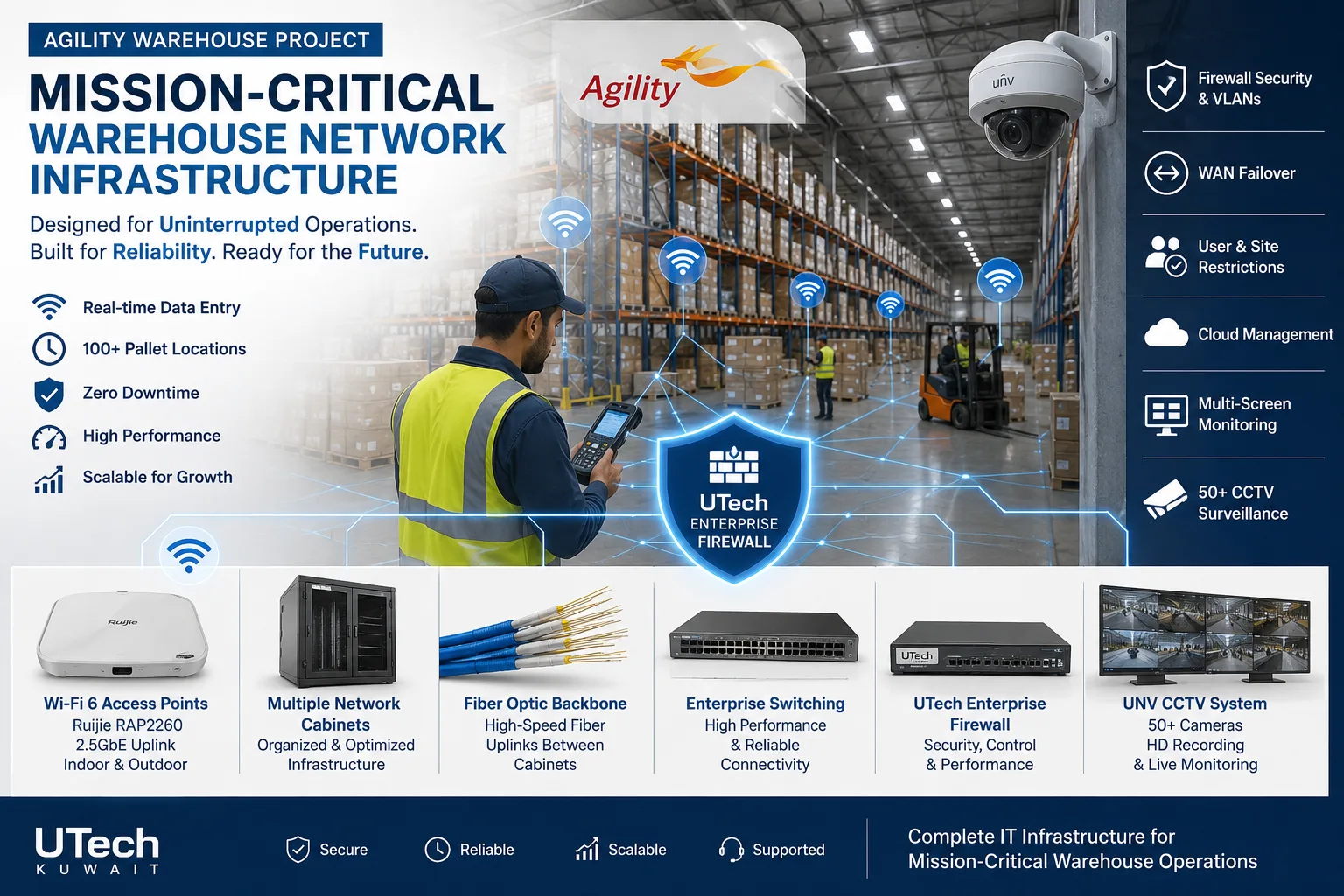 Mission-critical warehouse networkEnterprise Wi-Fi and switching for a major logistics operator's warehouse in Kuwait.Read the case study
 Multi-floor commercial Wi-Fi upgradeEnterprise Wi-Fi rebuilt across every floor of a commercial facility.Read the case study
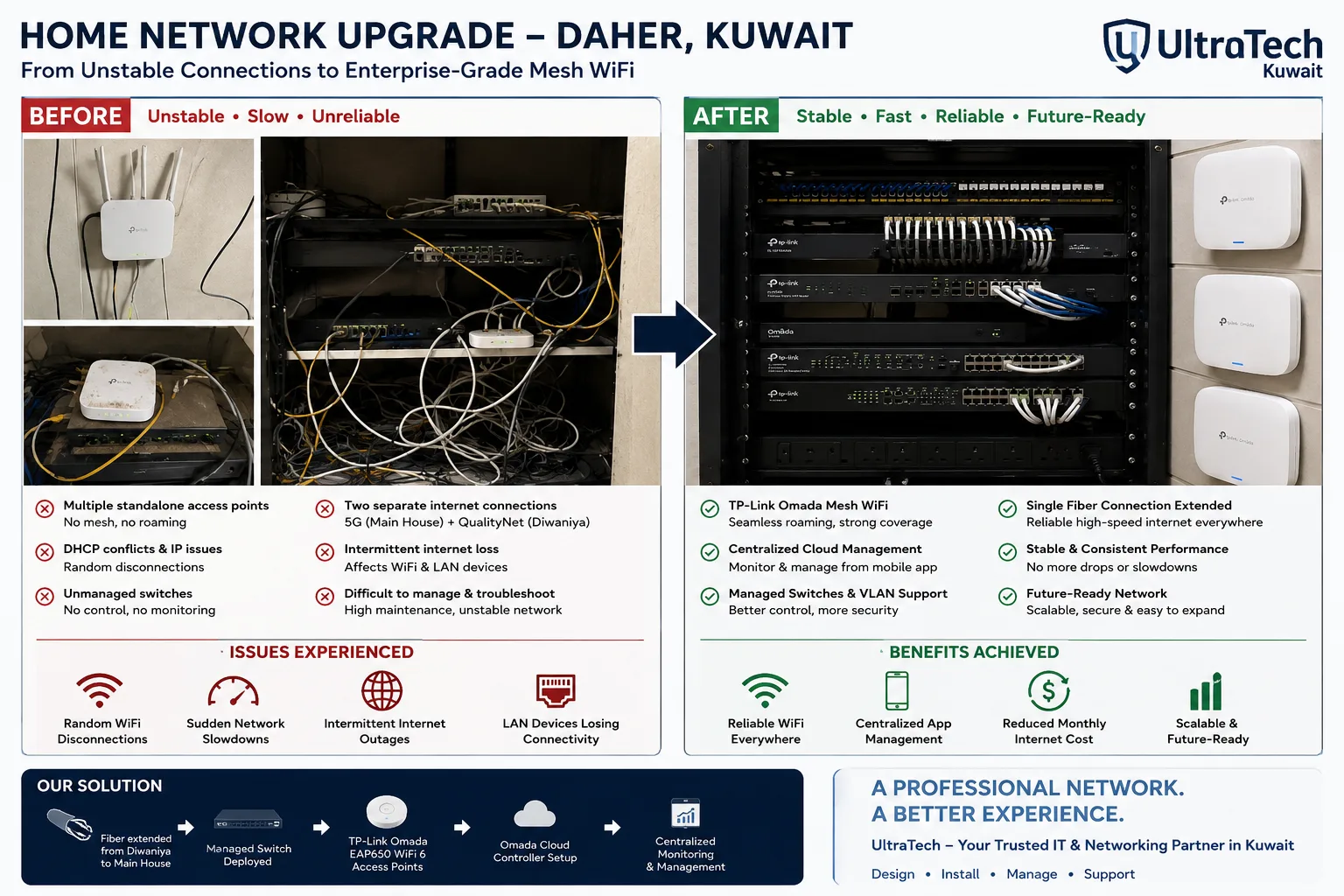 Two-building Omada mesh network, Daher7–8 unstable access points replaced by one managed Omada network across two buildings.Read the case study
How we deliver a network
- 1
Survey
Floor plan, rack position, desks, devices, existing cabling and what must never go down.
- 2
Design and quote
Topology, IP and VLAN plan and equipment options, with a written scope and quotation.
- 3
Build
Cabling, rack, switches, Wi-Fi and firewall, scheduled around your fit-out or after hours.
- 4
Test and hand over
Every point tested and labelled, failover shown working, and the documents handed to you.
At handover:Cable test resultsNetwork drawingIP and VLAN planLabelled outlets and patch panelsConfiguration backupsAdmin access and passwords
More explanation
What a network design contains
- High-level design (HLD)
- One drawing of the whole network: internet lines, firewall, core, the switches on each floor or building, Wi-Fi and the links between them.
- Low-level design (LLD)
- Port by port: which switch port feeds which outlet, access point, phone or camera, and on which VLAN.
- IP and VLAN plan
- The address ranges and separate networks for staff, guests, voice, cameras, servers and management, so nothing overlaps as the company grows.
- Wi-Fi plan
- Access point positions on the floor plan, from a survey or from drawings, with the networks each one carries.
- Security zones
- What can talk to what: guests to the internet only, cameras to the recorder only, staff to servers through the firewall.
- Bill of materials
- Every item with quantities and options, ready to buy or to put into a tender.
Planning the network for a new office
- Decide the rack position first
- The rack sets every cable length. It needs power, ventilation and a door that locks, and it should not end up in a pantry or under a water pipe.
- Count the points, then add spare
- Desks, printers, access points, phones, cameras, screens and access control all need a point. Spare points and spare switch ports cost little during a fit-out and a lot afterwards.
- Size the PoE budget
- Access points, IP phones and cameras are powered by the switch. The switch's total PoE power must cover all of them, with room to add more.
- Book the internet line early
- A fixed line can take weeks to arrive. A 5G line bridges the gap and stays on as the backup.
- Close the ceiling last
- Cabling goes in before ceilings and finishes close, which is why we work to the fit-out contractor's programme.
Which service fits your situation
| Your situation | Service | What you get |
|---|---|---|
| Moving into or fitting out an office | Office network installation | A working network on move-in day |
| A tender, a consultant package or an IT team that builds | Network design & architecture | Drawings, IP plan and bill of materials |
| A slow or ageing network, or equipment at end of life | Network upgrade & migration | New equipment, cut over after hours |
| A school, hospital, factory or compound with several buildings | Campus & multi-building networks | One network across the site |
Core, distribution and access switches compared
Small offices often merge core and distribution into one switch; larger sites keep them apart.
| Layer | Job | Typical location |
|---|---|---|
| Core | Routes between VLANs and connects everything | Main rack or server room |
| Distribution | Joins the switches of one floor or building | Floor rack or building rack |
| Access | Connects and powers each device | Every floor rack |
Network design terms explained
- LAN
- Local area network: the wired and wireless network inside one office or site.
- HLD
- High-level design: one drawing of the whole network and how its parts connect.
- LLD
- Low-level design: the port-by-port detail of what connects where.
- VLAN
- A separate network on the same switches, such as staff, guests, phones or cameras.
- PoE
- Power over Ethernet: devices powered through their network cable from the switch.
- Core switch
- The central switch that routes between networks and links the rest.
- Access switch
- The switch that desks, phones, access points and cameras plug into.
- Bill of materials (BOM)
- The list of every item and quantity needed to build the design.
- Cut-over
- The moment traffic moves from the old network to the new one.
- Rollback plan
- The tested steps to return to the old network if a cut-over goes wrong.
- Fiber backbone
- Fiber cabling that links floors or buildings at high speed.
- Point-to-point link
- Two directional radios carrying the network between buildings in line of sight.
Other networking services
Tell us about your office or site
Every network is designed to the site and quoted in writing. Send a floor plan or your requirements, or ask an engineer on WhatsApp.