Key facts
- Technicians
- Pakistani and Indian field technicians, led by an engineer with 13+ years in Kuwait
- For
- Offices, buildings and towers, shops, clinics, warehouses, schools and gates
- Work
- New installation, programming, fault finding, repair, upgrades and extra units
- New installations
- Akuvox IP intercom: door stations, indoor monitors, door release
- Existing systems
- Faults on other makes are diagnosed on site and quoted
- Configuration
- Network and PoE, SIP and call routing, door control, video, security hardening, backup
- Integrations
- IP phones and PBX, CCTV and NVR, access control, gates, lifts, mobile app, several branches
- Brands
- Official integrator for most of: Akuvox, Panasonic, Commax, Fermax, Aiphone, 2N, Hikvision, Dahua, Uniview (UNV), Grandstream, Ubiquiti (UBNT / UniFi), Dinstar, Comelit, BTicino, Urmet, Vimar (Elvox), Honeywell, Siedle
- Spoken in the team
- Arabic, English and Hindi
- Coverage
- All six governorates of Kuwait
- +965 60607910
Intercom technicians in Kuwait
An intercom technician installs, programs, tests and repairs the system that lets a person at a door speak to, and often see on video, the person inside who decides whether to open it. For a business this means a door station at the entrance, one or more answering points such as a reception monitor, an IP phone or a mobile app, a release that opens the lock, and the cabling that joins them.
UltraTech Kuwait's intercom technicians work on business sites: offices and head offices, buildings and towers, shops and showrooms, clinics, warehouses, schools and gates. They cover the whole life of the system: a site visit and written design, installation and cabling, programming of call routes and door release, testing and handover, and later fault finding, repair, extra units and upgrades.
The work is done by field technicians and engineers who are Pakistani and Indian, led by an engineer with 13+ years of experience in Kuwait. The team works in Arabic, English and Hindi, and each person has a profile further down this page.
Intercom installation for offices and buildings
A new intercom starts with a site visit. The technician looks at every door that needs a station, how each door is locked, where the answering points will be, and whether network or intercom cable is already in place. The visit becomes a written design and quote: the door stations, the monitors or app, the lock hardware and the call routes.
- 1Door stations are mounted at each entrance and the release relay is wired to the lock.
- 2Indoor monitors, IP phones or the mobile app are set up as the answering points.
- 3Cabling is run to a neat, labelled standard: Cat6 for IP systems, with power over Ethernet (PoE) on most models.
- 4Call routes, the directory, schedules and door release are programmed.
- 5Every route and release is tested with your staff before handover.
New installations use Akuvox IP intercom. It runs on the network cable, rings IP phones through SIP, and scales from a single door to a tower.
Intercom repair and fault finding
Most intercom faults come from a short list of causes, so a technician works through them in order instead of replacing equipment. The table lists the common ones.
| What you see | Usually | What the technician checks |
|---|---|---|
| No picture on the monitor | Cable or connector, power supply, the monitor, the door-station camera, or network settings on IP systems | Cable, supply, monitor, camera and network settings |
| No sound, or sound one way | Speaker, microphone, wiring or call settings | Speaker and microphone, wiring, volume and call settings |
| The door will not open | Release wiring, the lock's power supply or the lock itself | Release relay and wiring, supply to the lock, the lock or strike |
| Calls ring the wrong place, or nowhere | Directory, call groups or the schedule need correcting, not new hardware | Directory entries, call groups and the office-hours schedule |
| Worked, then stopped after a power cut | A power supply or the network switch did not recover | Power supplies, the PoE switch and device settings |
| Works some days, not others (IP) | A network or cabling problem, or a device dropping off the network | The cable run, the switch port and network settings |
Faults on systems of other makes are diagnosed on site and the repair is quoted. Parts are quoted for your approval before they are fitted.
Intercom maintenance and upgrades
An intercom works best when someone checks it. A maintenance visit can test each station, monitor, speaker, camera and door release, check the power supplies and record the settings, so a fault is found before the door goes unanswered. Maintenance is arranged separately from installation.
Upgrades are common and are done on the existing site: adding a monitor or a door station, extending to another floor or branch, moving from an analogue system to IP, or connecting the intercom to the office IP phones or PBX.
Types of intercom systems
Three kinds cover almost every business site. The site visit decides which one fits.
| Type | How it works | Best for | Needs |
|---|---|---|---|
| Audio intercom | Voice between a door station and handsets | Small offices and back doors where voice is enough | Cable to each station |
| Video intercom | Adds a camera at the door, so you see the visitor before opening | Reception and entrances | Video cable or a network, and monitors |
| IP intercom | Runs on network cable; rings IP phones and the mobile app | Offices, towers and businesses with several branches | Cat6 network cable, PoE on most models |
Advanced intercom configuration
An intercom that only rings is the simple part. What makes a business system dependable is the configuration behind it. The technicians configure and document each of the following as part of a job, on the models that support them.
| Area | What is configured | Why it matters |
|---|---|---|
| Network | Static addresses or DHCP reservations, a separate VLAN for intercom and phones, PoE switch ports and the PoE power budget | Calls stay clear, devices stay reachable, and a switch does not run out of power |
| SIP and calling | SIP accounts and extensions, codecs, ring groups, sequential or parallel ringing, call transfer, office-hours and after-hours schedules, fallback to a mobile | The right person answers at the right hour, and a missed call goes somewhere |
| Door control | Relay timing, exit button, door-contact and door-held-open alerts, DTMF release from a phone, keypad codes and temporary visitor PINs | The door opens only when it should, and an open door is reported |
| Users and directory | Directory names and numbers, unit and floor mapping, cards, PINs, access groups and schedules | Tenants and staff change without rewiring or reprogramming |
| Video | Resolution and frame rate, camera view and night mode, snapshot on call, an ONVIF or RTSP stream to a recorder | A clear picture of the visitor, and a record where it is needed |
| Security | Default passwords changed, unused services switched off, HTTPS and encrypted media where supported, firmware updated, separate admin and user accounts | An intercom is a network device: hardening it protects the building and the network |
| Backup and records | Configuration exported and stored, a device list with addresses and positions, passwords handed over | A failed device is replaced and restored quickly |
Features depend on the make and model. The technician confirms them at the site visit.
Intercom integrations
A business intercom is more useful when it works with the other systems on the site. UltraTech's technicians connect the intercom to the systems below using standard interfaces such as SIP, ONVIF and RTSP, relay outputs and Wiegand, on the models that support them.
| Integration | What it gives you | How it connects | Typical site |
|---|---|---|---|
| IP phones and IP PBX | Calls from the door ring desk phones and extensions and can be transferred, so staff answer without a separate handset | SIP registration to the IP PBX or phone system | Offices, clinics, towers with a reception |
| CCTV and recorders (NVR, VMS) | The door camera shows on the recorder or monitoring screen, and visitor footage is recorded | ONVIF or RTSP video stream from the door station | Offices, warehouses, buildings |
| Access control and attendance | The door opens with a card, PIN, fingerprint or face as well as from a call, and entries are logged | Relay and input wiring, Wiegand or IP, depending on the readers | Offices, factories, schools |
| Gates and barriers | The gate or barrier is released from the call or from a phone | Relay output to the gate or barrier controller | Car parks, warehouses, compounds |
| Lift and floor control | Visitors are released to the floor they are visiting, where the lift controller allows | Relay or serial interface to the lift controller | Towers and multi-tenant buildings |
| Mobile and cloud app | Calls answered on a smartphone away from the building, with video and door release | The app and cloud service of the intercom make, over the internet | Owners and managers who are often away |
| Door sensors and alarms | An alert when a door is held open or forced | Input on the door station or controller | Server rooms, stockrooms, back doors |
| Several branches | Branch intercoms answered from one head-office desk, or between branches | SIP over the company VPN or the internet | Retail chains, clinics, branch offices |
Which integrations are possible depends on the make and model and on the other system. The technician confirms them at the site visit and quotes them in writing.
Intercom solutions for business sites
Offices and head offices
A reception intercom that follows your working day.
- Door station at the entrance, monitor at reception
- Office-hours calls to desk phones, after-hours calls to mobiles
- Door release from the call, a card or a PIN
- Door camera recorded on the NVR
Buildings and towers
One lobby panel for every unit.
- Directory of units, a monitor or the app for each
- Visitors released to the right floor where the lift controller allows
- Gate and car-park stations
- Units added or renamed without rewiring
Shops and showrooms
The back door answered from the counter.
- Station on the back or staff door
- Calls to the counter phone or a mobile
- Release from the call
- A snapshot of the caller on supported models
Clinics
The front desk controls every door.
- Staff and back doors answered at reception
- Different routing for clinic hours
- Release from the call
- A door-held-open alert
Warehouses and gates
The gate answered from the office or a mobile.
- Outdoor gate station with a camera
- Relay to the gate or barrier controller
- After-hours calls to a mobile
- Entry recorded on the NVR
Schools
Entrances controlled from the office.
- Entrance stations answered at the school office
- Release from the call, with the entry recorded
- Access control on staff entrances
- A second answering point as a fallback
Businesses with several branches
Many sites, one standard.
- The same model and settings at every branch
- Calls answered locally or at head office
- Configuration documented and backed up per site
- Remote changes over VPN where you allow them
Intercom equipment and brands
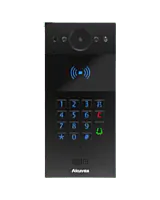
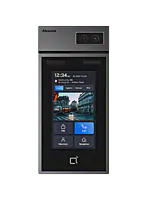
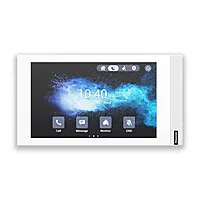
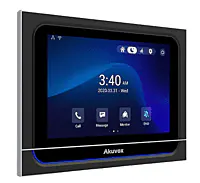
UltraTech is an official integrator for most of the intercom brands used in Kuwait. Its technicians install, configure, integrate and repair systems of the major brands, new and existing. Akuvox IP intercom is the standard for new installations: door stations, indoor monitors and kits chosen to the site. The brand and models for a job are decided at the site visit.
Intercom brands we integrate
 Akuvox
 Panasonic
- Commax
- Fermax
- Aiphone
- 2N
 Hikvision
 Dahua
Dahua Uniview (UNV)
 Grandstream
 Ubiquiti (UBNT / UniFi)
 Dinstar
 Comelit
 BTicino
- Urmet
- Vimar (Elvox)
 Honeywell
 Siedle
UltraTech is an official integrator for most of these brands. Brand names belong to their respective owners.
Equipment we install
From our catalogue. The visit decides the models.

How a technician visit works
- 1Message or call with the site and what the intercom is doing.
- 2A technician visits and checks the doors, locks, cabling and the system.
- 3Repairs and larger work are quoted in writing, with parts quoted for your approval.
- 4The work is done, every call route and door release is tested with your staff, and the settings and passwords are handed over.
What decides the quote
- The number of doors and answering points
- The type of lock on each door
- Whether network or intercom cabling is already in place
- Monitors, IP phones or the mobile app as answering points
- A new system, an extension, or a repair
- Access to the site: heights, outdoor stations and weather
Every business job is designed to the site and quoted in writing after the visit.
Intercom terms explained
- Door station
- The unit at the door with a speaker, microphone, call button and often a camera.
- Indoor monitor
- The screen and handset inside that shows the visitor, lets you speak and releases the door.
- SIP
- The standard that lets an IP intercom ring IP phones and IP PBX systems.
- PoE (power over Ethernet)
- Power delivered over the same network cable as the data, so most devices need no separate supply.
- Door release
- A relay that opens the lock when the person answering presses a button.
- ONVIF
- An open standard that lets cameras and door stations work with recorders and video software from different makers.
- RTSP
- A standard for streaming live video from a camera or door station to a recorder or viewer.
- VLAN
- A separate logical network on the same switches, used to keep intercom and phone traffic apart from other traffic.
- DTMF
- The keypad tones a phone sends during a call; pressing a digit on the phone can release the door.
- Wiegand
- A common wiring standard between card, PIN or fingerprint readers and an access controller.
- Exit button (REX)
- A button inside that opens the door without a call.
- Analogue and IP intercom
- Analogue uses dedicated cable for each station; IP runs on the building's network and can be extended and managed over it.
Technicians and engineers
Your site is looked after by UltraTech's field technicians and engineers: Pakistani and Indian technicians, led by an engineer with 13+ years of experience in Kuwait. The team works in Arabic, English and Hindi.
Areas we cover
The technicians cover all six governorates of Kuwait, from Kuwait City and Salmiya to Fahaheel, Mangaf, Jahra and Sabah Al-Salem. The visit is booked for the address of your site.
- Capital (Al Asimah)
- Hawalli
- Farwaniya
- Mubarak Al-Kabeer
- Ahmadi
- Jahra
In short
- UltraTech Kuwait's technicians install, program, test and repair video and audio intercom for businesses in Kuwait.
- They work on offices, buildings and towers, shops, clinics, warehouses, schools and gates, in all six governorates.
- They provide advanced configuration (network and PoE, SIP and call routing, door control, security hardening, backup) and integrate the intercom with IP phones and PBX, CCTV and NVR, access control, gates, lifts and mobile apps.
- UltraTech is an official integrator for most of the leading intercom brands, among them Akuvox, Panasonic, Commax, Fermax, Aiphone, 2N, Hikvision, Dahua, Uniview, Grandstream and Ubiquiti; new installations use Akuvox IP intercom.
- Every job starts with a site visit, is quoted in writing, and ends with a tested handover.
- The team is Pakistani and Indian technicians and engineers, led by an engineer with 13+ years in Kuwait, working in Arabic, English and Hindi.