Key facts
- Technicians
- Pakistani and Indian field technicians and engineers, led by an engineer with 13+ years in Kuwait
- For
- Offices, buildings and towers, branches and retail chains, clinics, warehouses, schools, hotels
- Switching and Wi-Fi
- Layer 2 and Layer 3 switching, PoE, stacking, enterprise Wi-Fi design, roaming and guest access
- Routing
- Static routing, OSPF, BGP, VRRP, SD-WAN, IPsec and WireGuard VPN
- Segmentation
- VLANs, inter-VLAN policy, client isolation, private VLANs, firewall zones
- Security
- Next-generation firewalls, IPS, web filtering, 802.1X and RADIUS, high availability
- Integration
- IP phones and PBX, CCTV, access control, intercom, servers, cloud and sign-in systems
- Brands
- Official integrator for many of: Cisco, Meraki, Juniper, Aruba, HPE, Huawei, H3C, Dell, Extreme, Ruckus, Fortinet, Palo Alto, Check Point, SonicWall, Sophos, WatchGuard, Barracuda, Forcepoint, Trend Micro, Netgate (pfSense), Ubiquiti, MikroTik, TP-Link, Ruijie, Grandstream, Zyxel, Netgear, D-Link, Cambium, Peplink, Teltonika
- Spoken in the team
- Arabic, English and Hindi
- Coverage
- All six governorates of Kuwait
- +965 60607910
Network and Wi-Fi technicians in Kuwait
A network technician installs, configures, tests and repairs the systems that carry a business's data: cabling, switches, routers, firewalls, Wi-Fi access points and the links to internet providers. For a business the network is what every other system depends on. Phones, cameras, access control, point-of-sale, servers and cloud services all run across it, so a weak network shows up as problems everywhere else.
UltraTech Kuwait's network technicians and engineers work on business networks: single offices, multi-floor buildings and towers, branches and retail chains, clinics, warehouses and factories, schools and campuses. They cover survey and design, installation and cabling, enterprise switching and routing, enterprise Wi-Fi, firewalls and VPN, VLAN segmentation and isolation, internet and WAN links, monitoring, fault finding and a documented handover.
The work is done by field technicians and engineers who are Pakistani and Indian, led by an engineer with 13+ years of experience in Kuwait. The team works in Arabic, English and Hindi, and each person has a profile further down this page.
Integration-first network engineering
UltraTech works as a systems integrator. Networks, IP phones, CCTV, access control and attendance, intercom, servers, Wi-Fi and cloud services are designed to work together, so the network is built around what the client actually runs instead of being forced into a fixed package.
Because the whole stack is integrated, almost every requirement can be configured: a separate network for one department, sign-in tied to company accounts, a guest portal with the company's own page, voice that is always prioritised, a branch that fails over to 5G, or an old system that must keep working beside a new one. The technicians design the configuration to the client's need, test it, and document it.
- One team for network, phones, cameras, access control and intercom
- Configuration to the client's requirement, not a fixed package
- Old and new equipment working together
- Every setting documented and handed over
A typical business network design
Most business networks follow the same layered design, sized to the site. A small office may fold the layers into one firewall and one switch; a tower or campus uses every layer with redundancy.
Layers of a business network
- InternetPrimary ISPBackup ISP or 5GLeased line / fiber
- EdgeFirewall pair (high availability)NATIPS and web filteringSite-to-site and remote VPNBGP to the ISPs
- CoreLayer 3 core switchesInter-VLAN routingOSPFVRRP gateway redundancyLink aggregation
- AccessPoE access switchesVLAN per functionPort security802.1X
- DevicesWi-Fi access pointsIP phonesCCTV camerasPCs and printersIoT and POS
Management traffic (switch, firewall and access-point administration) sits on its own VLAN, reachable only from admin hosts.
Network solutions for business sites
Offices and head offices
A network that stays up and is easy to manage.
- Firewall, core and access switching, enterprise Wi-Fi
- Staff, voice, guest and printer VLANs
- Dual internet links with automatic failover
- Documented IP and VLAN plan
Buildings and towers
One structured network for many tenants.
- Redundant core, per-floor access switching
- Tenant VLANs and isolation
- Building-wide Wi-Fi with roaming
- Fiber risers between floors
Branches and retail chains
Many sites managed as one.
- Site-to-site VPN or SD-WAN to head office
- The same design and settings at every branch
- POS and payment terminals on a protected VLAN
- Remote management and backups
Clinics and hospitals
Segmented networks for patient and business traffic.
- Separate VLANs for clinical devices, staff and guests
- Wi-Fi with roaming for mobile staff
- Firewall policy and logging
- Redundant links for critical areas
Warehouses and factories
Coverage and links across large, harsh sites.
- Industrial and outdoor switches
- Long-range and point-to-point wireless
- Wi-Fi for scanners and handhelds
- Fiber between buildings
Schools and campuses
High-density Wi-Fi and content control.
- High-density access points per classroom or hall
- Staff, student and guest networks
- Web filtering and bandwidth control
- Central management of every building
Hotels and hospitality
Guest Wi-Fi that works and stays separate.
- Guest Wi-Fi with a captive portal and client isolation
- Bandwidth limits per guest
- Back-of-house network kept private
- Coverage in rooms, lobbies and outdoor areas
Structured cabling, fiber and network cabinets
A network is only as good as its cabling. The technicians install and certify the physical layer: copper and fiber, patch panels, outlets, cabinets and power.
| Item | What is installed | Notes |
|---|---|---|
| Copper cabling | Cat6, Cat6A and Cat8 cabling, outlets and faceplates | Cat6A for 10G and high-power PoE runs; every link tested end to end |
| Fiber | Multimode (OM3, OM4) and single-mode (OS2) cable, splicing, patch panels and patch cords | Between floors, buildings and racks |
| Patch panels and labelling | Panels, patch cords and labels to a numbering standard | Any port can be traced in seconds |
| Network and server cabinets | Wall and floor cabinets, cable management, ventilation and earthing | Sized for growth |
| Power | PDUs and UPS for core equipment | Switches and firewalls stay up through power cuts |
| Testing and certification | A cable test report for each link | Handed over with the documentation |
Cabling is installed to structured-cabling standards and tested before the active equipment is configured.
Enterprise switching
Switches are where a network is won or lost: the wrong spanning-tree root, an unmanaged loop or an exhausted PoE budget will bring down a floor. The technicians design and configure Layer 2 and Layer 3 switching, stacks and uplinks, and document each port role.
| Capability | What it does | Where it is used |
|---|---|---|
| Layer 2 and Layer 3 switching | Switches frames inside a VLAN and routes between VLANs at wire speed | Every office; core and distribution of buildings |
| VLAN trunking (802.1Q) | Carries many VLANs over one link between switches, firewalls and access points | Between switches and to Wi-Fi access points and servers |
| Link aggregation (LACP) | Bundles several links into one for bandwidth and redundancy | Switch uplinks, servers, firewalls |
| Spanning tree (RSTP, MSTP) | Prevents loops and fails over to a backup path | Any network with redundant links |
| Stacking and MLAG | Makes several switches behave as one, so a switch can fail without an outage | Core and distribution; server racks |
| PoE, PoE+ and PoE++ | Powers phones, access points and cameras over the network cable, within a managed power budget | Access switching |
| QoS and voice VLAN | Prioritises voice and video over bulk traffic | Offices with IP phones and video calls |
| Port security and 802.1X | Allows only known devices and users onto a port | Offices, meeting rooms, public sockets |
| DHCP snooping and dynamic ARP inspection | Blocks rogue DHCP servers and address spoofing | Any shared or multi-tenant network |
| IGMP snooping and storm control | Contains multicast and broadcast traffic | CCTV, IPTV and large flat networks |
| 10G and 25G uplinks (SFP+, SFP28) and fiber | High-speed links between floors, buildings and racks | Core, aggregation, data rooms |
Features depend on the make and model. The technician confirms them at the site visit.
Enterprise wireless (Wi-Fi) design and configuration
Enterprise Wi-Fi differs from home Wi-Fi in what sits behind it: many access points managed as one system, VLAN-based separation of users, sign-in against company accounts, roaming between access points, and capacity planned for the number of devices. A home router cannot do any of this, which is why business Wi-Fi is designed to the site.
Business Wi-Fi is designed, not just installed. The technicians survey the site, plan access point positions, channels and power, then configure security, roaming and guest access so that coverage is the same in every room and a failure of one access point does not take down a floor.
| Area | What is configured | Why it matters |
|---|---|---|
| Survey and RF design | Heatmap survey, access point positions, channel and power plan, 2.4, 5 and 6 GHz, channel widths | Coverage and capacity are planned before equipment is bought |
| Management | Controller-based, cloud-managed or controller-less deployment with central firmware, templates and alerts | One place to manage every access point and site |
| SSIDs and VLAN mapping | Separate SSIDs and VLANs for staff, guests, voice and devices | Wi-Fi follows the same segmentation as the wired network |
| Authentication | WPA2 and WPA3 Enterprise with 802.1X and RADIUS, WPA3 or private pre-shared keys for devices, certificate options | Each person signs in as themselves, and a leaver loses access at once |
| Roaming | 802.11k, 802.11v and 802.11r fast roaming, minimum data rates, band steering | Calls and video do not drop as people walk between rooms |
| Guest access | Captive portal or vouchers, client isolation, bandwidth limits, time limits | Visitors get internet without reaching the company network |
| High density | Airtime fairness, load balancing, lower transmit power, more access points at lower power | Halls, classrooms and offices stay fast when full |
| Outdoor and links | Weatherproof access points, long-range and point-to-point or multipoint links between buildings | Coverage in yards, car parks and between sites |
| Monitoring | Client health, interference and rogue-AP detection, usage reports | Problems are seen before users report them |
Wi-Fi 6, 6E and 7 are used where the access points and client devices support them.
VLANs, segmentation and isolation
A flat network lets any device reach any other, so one infected laptop or one compromised camera can reach servers and files. Segmentation divides the network into VLANs by function and puts a policy between them. Isolation goes further: guest devices cannot see each other, and cameras and IoT devices can reach only what they need.
| VLAN | Name | Example subnet | Purpose |
|---|---|---|---|
| 10 | Management | 10.10.10.0/24 | Switch, firewall and access-point administration |
| 20 | Staff | 10.10.20.0/23 | Office computers and laptops |
| 30 | Voice | 10.10.30.0/24 | IP phones and the IP PBX |
| 40 | CCTV | 10.10.40.0/24 | Cameras and the recorder |
| 50 | Guest | 10.10.50.0/22 | Visitor Wi-Fi, isolated from everything internal |
| 60 | IoT and devices | 10.10.60.0/24 | Door controllers, sensors, smart devices |
| 70 | Servers | 10.10.70.0/24 | File, application and virtualisation servers |
| 80 | POS and payments | 10.10.80.0/24 | Point-of-sale and payment terminals on a protected segment |
An example plan. Every site gets its own numbering and sizes, documented in the handover pack.
| From | To | Policy |
|---|---|---|
| Staff | Servers | Allowed by service and group |
| Staff | Internet | Allowed with web filtering and logging |
| Voice | IP PBX | Allowed; everything else blocked |
| CCTV | Recorder only | Allowed; internet and other VLANs blocked |
| Guest | Internet only | Allowed; internal networks blocked and clients isolated from each other |
| IoT and devices | Their controller | Allowed; limited internet where needed |
| POS and payments | Payment provider | Allowed on required ports only |
| Management | Admin hosts only | Allowed from named administrators |
Enforced on the firewall or on a Layer 3 switch with access control lists.
- Client isolation on guest Wi-Fi, so visitors' devices cannot reach each other.
- Private VLANs and port isolation on shared or multi-tenant switches.
- Firewall zones and access control lists between VLANs.
- VRF separation where tenants or services must have fully separate routing.
Routing: OSPF, BGP and high availability
Routing decides how traffic finds its way between VLANs, buildings, branches and the internet. Small sites use static routes. Larger and multi-site networks use dynamic routing so that a failed link or device is routed around automatically.
| Feature | What it does | Typical use |
|---|---|---|
| Static routes and default gateways | Fixed paths, simple and predictable | Small offices, single-ISP sites |
| OSPF | Link-state routing inside the company: areas, link costs, passive interfaces, authentication and route summarisation | Multi-VLAN offices, buildings, campuses and data rooms |
| BGP (eBGP and iBGP) | Exchanges routes with ISPs and between sites: dual-homing to two providers, prefix filters, local preference, AS-path prepending, communities and route maps | Businesses with two ISPs, their own address space or ASN, and data centres |
| VRRP and gateway redundancy | Two devices share one gateway address, so a failure causes no outage | Core, firewalls and branch routers |
| Policy-based routing | Sends chosen traffic over a chosen link | Sending voice or backups over a specific ISP |
| Route redistribution and filtering | Joins routing domains and keeps unwanted routes out | Merging networks, connecting to ISPs and partners |
| IPsec, IKEv2 and WireGuard VPN | Encrypted tunnels between sites and to remote users | Branches, remote staff, cloud links |
| SD-WAN | Steers traffic over the best of several links with central policy | Retail chains and multi-branch businesses |
| IPv6 dual-stack | Runs IPv4 and IPv6 side by side | Sites whose ISP or customers use IPv6 |
The right protocol is chosen to the size of the network and the ISPs involved.
Firewall and network security
The firewall is the control point between the company, the internet and the VLANs inside. The technicians size, install and configure next-generation firewalls, then keep their policy tidy, logged and up to date.
| Control | What is configured | Why it matters |
|---|---|---|
| Zone-based policy | Rules between VLANs and the internet by zone, with least-privilege access | Only the traffic the business needs is allowed |
| NAT and publishing | Source and destination NAT, port forwarding, published services behind a DMZ | Internal servers are reachable safely, and only as intended |
| Threat prevention | IPS, anti-malware, DNS security, application control | Known attacks and malware are blocked at the edge |
| Web and content filtering | Category filtering, SSL inspection where lawful, per-group policy, bandwidth control | Staff and guests use the internet within company policy |
| VPN | Site-to-site IPsec, SSL and IPsec remote access, multi-factor sign-in | Secure access for branches and staff away from the office |
| High availability | Active-passive or active-active firewall pairs with state sync | A failed firewall does not stop the business |
| Logging and reporting | Syslog, scheduled reports, forwarding to a SIEM where one exists | Incidents are visible and provable |
| Zero trust and cloud security | Identity-based access, ZTNA and SASE or cloud-delivered filtering where the client uses them | Access follows the person and the device, not the network location |
| Hardening | Management VLAN, multi-factor admin sign-in, unused services off, firmware kept current, configuration backups | The firewall itself is not the weak point |
Firewalls from Fortinet, Palo Alto Networks, Check Point, SonicWall, Sophos, WatchGuard, Cisco, MikroTik and pfSense are configured.
Business internet, WAN and failover
The internet connection is a single point of failure unless it is designed otherwise. The technicians connect and configure business internet links from the operators in Kuwait and design the paths between sites.
| Link | What it is | Good for |
|---|---|---|
| Business fiber (FTTx) | A fixed fiber line from the operator with a business service level | Offices, towers and branches in fiber areas |
| Leased line | Dedicated, symmetric capacity between two points or to the internet | Head offices, data rooms, critical sites |
| Wireless fixed broadband and point-to-point | Radio links from the operator, or a private link between two buildings | Sites without fiber, and links between buildings |
| 5G business internet | A 5G router with an external antenna and, where offered, a static address | Fast deployment, and as a backup link |
| Dual-ISP load balancing and failover | Two links used together, or one as an automatic backup | Any site that cannot be offline |
The client orders the line from the operator; UltraTech connects, configures and tests it, and designs how it fits the network.
- Link health checks and automatic failover between providers.
- Static public addresses, NAT and port publishing for servers and cameras.
- Quality of service and bandwidth control so voice, video and cloud applications stay responsive.
- Site-to-site links over VPN, fiber or point-to-point wireless.
- Business routers, gateways and Wi-Fi extenders for small branch sites.
- 5G routers with external antennas where fixed lines are slow to arrive. In-building mobile coverage is planned with the mobile operator.
- DNS and DHCP services, local or centralised.
Network platforms we configure
Most Kuwait businesses run one or two network platforms. The technicians configure the platform the client already has or recommend one to suit the site, and they can bring several together on the same network.
Ubiquiti UniFi
Controller-managed switching, Wi-Fi and gateways.
- UniFi Network controller or cloud, sites and VLANs
- Gateways and switches, Enterprise and Pro series
- UniFi access points with roaming and guest portals
- Scheduled backups and updates
TP-Link Omada
Switches, access points and gateways under one controller.
- Omada controller: hardware, software or cloud
- Switch and access-point profiles, VLANs and PoE
- Captive portal and guest isolation
- Site-to-site VPN
Ruijie Reyee
Cloud-managed switches, access points and gateways.
- Reyee cloud management
- Layer 2 and Layer 3 managed switches
- Wi-Fi 6 access points
- Mesh and PoE deployments
Cisco and Meraki
Catalyst switching and Meraki cloud-managed networks.
- Catalyst and Business switches: VLANs, trunks, routing
- Meraki dashboard for switches, access points and security appliances
- 802.1X and RADIUS sign-in
- Link redundancy and monitoring
Aruba (HPE)
Switching and Wi-Fi from branch to campus.
- Aruba switch configuration: VLANs, stacking, routing
- Instant On and cloud-managed Wi-Fi
- 802.1X, guest access and roaming
- Monitoring and firmware management
Fortinet
FortiGate firewalls with managed switches and access points.
- Policy, NAT, IPS and web filtering
- Site-to-site and remote-access VPN
- FortiSwitch and FortiAP managed from the firewall
- High-availability pairs and logging
Palo Alto, Check Point, SonicWall, Sophos, WatchGuard
Next-generation firewalls.
- Zone and application policies
- Threat prevention and URL filtering
- VPN and remote access
- High availability and logging
MikroTik
RouterOS routing, switching and wireless.
- OSPF and BGP routing, VRRP
- VLANs, bridges, queues and firewall
- Hotspot and guest control
- IPsec and WireGuard VPN
pfSense on Netgate
Open-source firewall and router on supported appliances.
- Firewall rules, NAT and VLANs
- OpenVPN, WireGuard and IPsec
- Multi-WAN failover and load balancing
- IDS and IPS, proxy and logging packages
Juniper, Extreme, Ruckus, Huawei, H3C, Dell
Enterprise switching, routing and wireless.
- Campus and data-room switching
- Wi-Fi controllers and access points
- Routing and VLAN design
- Monitoring and documentation
Advanced network configuration
The configuration behind the equipment is what makes a business network dependable. The technicians configure and document each of the following as part of a job, on equipment that supports it.
| Area | What is configured | Why it matters |
|---|---|---|
| Switching | VLANs and trunks, LACP, spanning-tree root and priorities, BPDU and loop guard, storm control, PoE budget | No loops, no outages, and power for every device |
| Layer 3 | Routed interfaces per VLAN, DHCP relay, static routing, OSPF areas, BGP neighbours and filters, VRRP | Fast, redundant routing and clean failover |
| Quality of service | DSCP marking and trust, voice and video priority, rate limits | Calls stay clear when the network is busy |
| Access security | 802.1X, port security, DHCP snooping, dynamic ARP inspection, access control lists, SSH and HTTPS only, SNMPv3 | Only known devices and administrators get in |
| Wi-Fi | Channel and power plan, SSID to VLAN mapping, roaming, band steering, guest isolation, RADIUS | Reliable coverage with the right access for each user |
| Redundancy | Stacking or MLAG, dual uplinks, firewall high availability, UPS on core equipment, spare configuration | A single failure does not stop the site |
| Management and monitoring | NTP, syslog, SNMP and NetFlow, alerts, naming and addressing standard, scheduled configuration backups | Faults are found early and a failed device is restored fast |
| Documentation | Network diagram, IP and VLAN plan, port map, firewall rule list, credentials and warranty details | Anyone can support the network after handover |
Features depend on the make and model. The technician confirms them at the site visit.
Network integrations
A business network carries the other systems on the site. The technicians build the network to suit them and connect it to the services around it.
| Integration | What it gives you | How it connects | Typical site |
|---|---|---|---|
| IP phones and IP PBX | Clear calls with priority, powered phones, a PBX reachable from branches | Voice VLAN, QoS, PoE, SIP over the LAN and VPN | Offices, clinics, branches |
| CCTV and recorders | Cameras on their own protected VLAN with enough bandwidth | PoE switches, dedicated VLAN, multicast control | Offices, warehouses, buildings |
| Access control and attendance | Door controllers and attendance devices managed on a separate network | Dedicated VLAN, static addressing, firewall rules to the server | Offices, factories, schools |
| Intercom | Door stations and monitors powered and reachable | PoE, VLAN, SIP to the PBX | Offices, towers |
| Servers and virtualisation | High-bandwidth, redundant connections to servers and storage | LACP, 10G uplinks, storage VLAN | Data rooms and server racks |
| Cloud and remote sites | Secure links to cloud services and other sites | Site-to-site VPN, SD-WAN, dedicated links | Multi-branch and cloud-first businesses |
| Directory and sign-in | Wi-Fi and wired access tied to company accounts | RADIUS and 802.1X with Active Directory or LDAP | Offices of any size |
| Monitoring tools | Visibility of devices, links and traffic | SNMP, NetFlow and syslog to a monitoring system | Multi-site and managed networks |
| Point-of-sale and payments | Payment devices kept on a protected segment | Dedicated VLAN with a strict firewall policy | Retail, restaurants, clinics |
Which integrations are possible depends on the equipment and the other system. The technician confirms them at the site visit and quotes them in writing.
Network assessment and health check
Before a redesign, or when a network is slow and nobody knows why, a network assessment gives the facts. The technicians inventory the equipment, measure the network, review its security and report what to fix first.
- Inventory of switches, firewalls, access points, cabling and links
- Wi-Fi survey: coverage, channels and interference
- Performance baseline: throughput, latency, packet loss and uplink load
- Configuration review: VLANs, spanning tree, routing, QoS and firmware
- Security review: firewall rules, open services, default passwords and guest isolation
- A written report with priorities and a plan to fix each finding
Managed network services and support
A network needs looking after once it is installed. UltraTech's technicians provide ongoing support and can monitor, update and back up the network under a maintenance arrangement, so faults are seen early and changes are made safely. Maintenance is arranged separately from installation.
- Monitoring of devices, links and Wi-Fi, with alerts
- Firmware and security updates on a schedule
- Scheduled configuration backups and a change log
- Fault response, with on-site visits when a remote fix is not enough
- Moves, adds and changes: new VLANs, rules, access points and users
- Regular reports on health, capacity and security
Network and Wi-Fi fault finding
Most network faults come from a short list of causes, so a technician measures and works through them in order instead of replacing equipment.
| What you see | Usually | What the technician checks |
|---|---|---|
| Wi-Fi is slow in busy areas | Too few or badly placed access points, channel overlap, wide channels, low data rates | Heatmap and channel plan, client counts, data rates, uplink speed |
| Wi-Fi drops while walking | Roaming not tuned, weak overlap between access points | Roaming settings, power levels, access-point spacing |
| No internet, but the office network works | ISP link or gateway down, DNS, NAT or firewall policy | ISP hand-off, gateway, DNS, firewall rules and logs |
| The whole network slows or stops | A switching loop or broadcast storm, or an overloaded uplink | Spanning-tree state, loop and storm counters, uplink load |
| Devices get no address or the wrong one | DHCP scope full, rogue DHCP server, wrong VLAN | DHCP leases and scope, DHCP snooping, port VLAN |
| Cannot reach a server or another VLAN | Missing route or access-list rule, trunk not carrying the VLAN | Routing table, firewall and ACL rules, trunk allowed list |
| A branch VPN is down | ISP change, tunnel settings mismatch, NAT-T, expired certificate or key | Tunnel status and logs, ISP address, phase settings |
| Failover to the second ISP does not happen | Health checks missing, BGP or routing preference wrong | Link monitoring, route preference, BGP session and prefixes |
| Devices on PoE reboot | PoE budget exhausted, faulty cable or injector | PoE usage per switch and port, cable test |
Network types explained
- Router, switch and access point
- A router connects networks and the internet, a switch connects wired devices within a network, and an access point connects wireless devices to the wired network.
- LAN, WAN and VLAN
- A LAN is a local network at one site, a WAN links sites over distance, and a VLAN divides a LAN into separate logical networks.
- Types of firewall
- Packet-filtering, stateful inspection, proxy or application-level, next-generation (NGFW) with intrusion prevention and application control, and unified threat management (UTM) combining several security functions in one appliance.
- Types of VLAN
- Data VLAN for users, voice VLAN for phones, management VLAN for device administration, guest VLAN for visitors, and the native and default VLANs used for untagged traffic.
- Types of network cable
- Twisted-pair copper (Cat5e, Cat6, Cat6A, Cat8), multimode fiber (OM3, OM4), single-mode fiber (OS2), and coaxial for specialist links.
- Wi-Fi standards
- Wi-Fi 5 (802.11ac), Wi-Fi 6 and 6E (802.11ax) and Wi-Fi 7 (802.11be). Newer standards raise capacity and efficiency, and both the access points and the client devices must support them.
- What SD-WAN is for
- SD-WAN steers traffic over the best of several links by application and policy, with central management, which suits businesses with many branches.
Enterprise network brands
UltraTech is an official integrator for many of the networking and security brands used in Kuwait, and its technicians install, configure and support the major enterprise and business-grade platforms, new and existing. The brand and models for a job are chosen at the site visit to suit the site, the budget and any equipment the client already has.
Network and security brands we integrate
 Cisco
Cisco Meraki
 Juniper
 Aruba (HPE)
 HPE
HPE Huawei
- H3C
 Dell
Dell Extreme Networks
 Ruckus
 Fortinet
 Palo Alto Networks
 Check Point
 SonicWall
 Sophos
 WatchGuard
 Barracuda
 Forcepoint
 Trend Micro
 Netgate (pfSense)
 Ubiquiti (UniFi)
 MikroTik
 TP-Link (Omada)
 Ruijie (Reyee)
 Grandstream (GWN)
- Zyxel
 Netgear
 D-Link
 Cambium Networks
 Peplink
 Teltonika
UltraTech is an official integrator for many of these brands. Brand names belong to their respective owners.
Equipment we supply and install
From our catalogue. The visit decides the models.
 Ubiquiti NetworksUbiquiti UniFi U6-LR WiFi 6 Long-Range Access Point
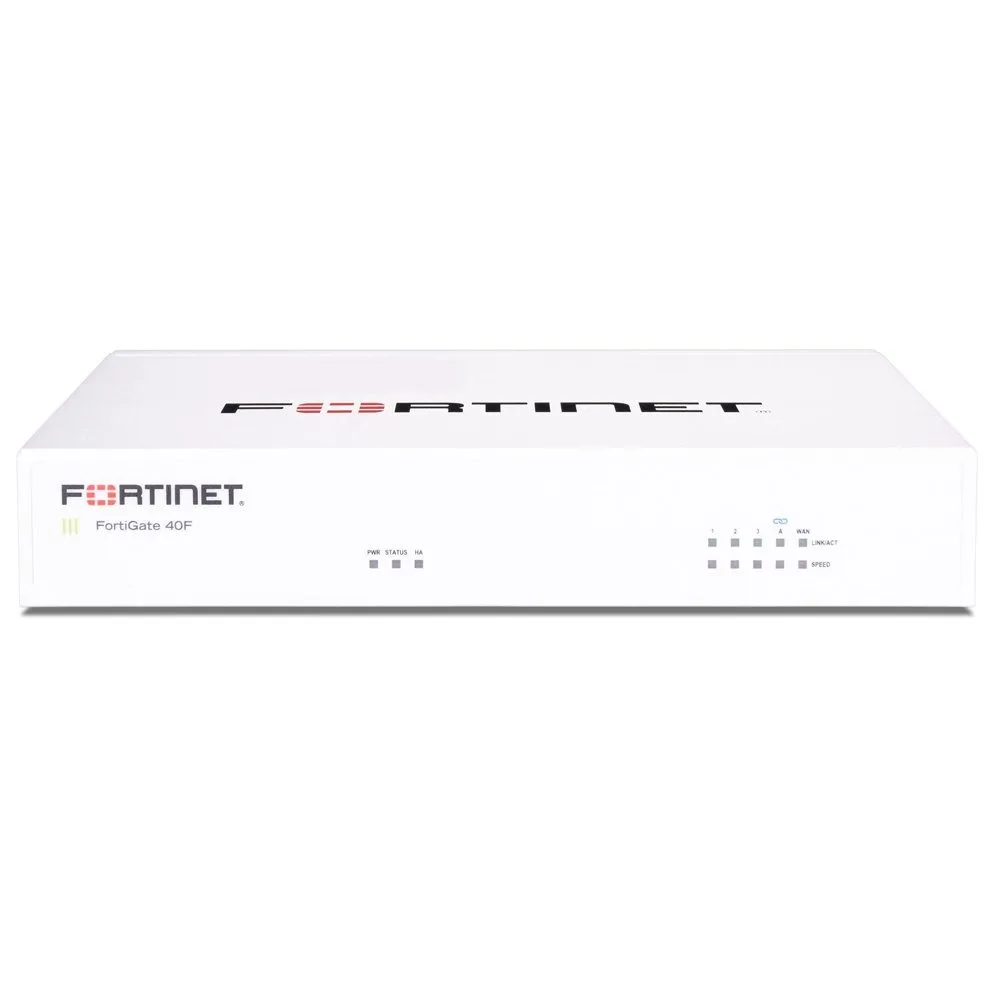 FortinetFortiGate 40F Next-Generation Firewall
 Ruijie ReeyeRuijie Reeye Layer 3 Chassis Cloud-Managed Switch
 TP-LinkTP-Link Omada Pro S6500-24GP4XF 24-Port Gigabit Stackable L3 Managed PoE+ Switch with 4 10G Slots
 Cisco SystemsCisco Catalyst 9300 Switch
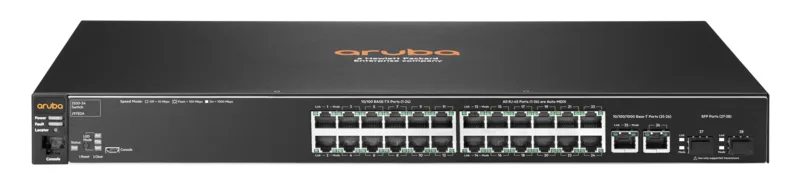 Aruba NetworksAruba 2530 24-Port 10/100 PoE+ Switch
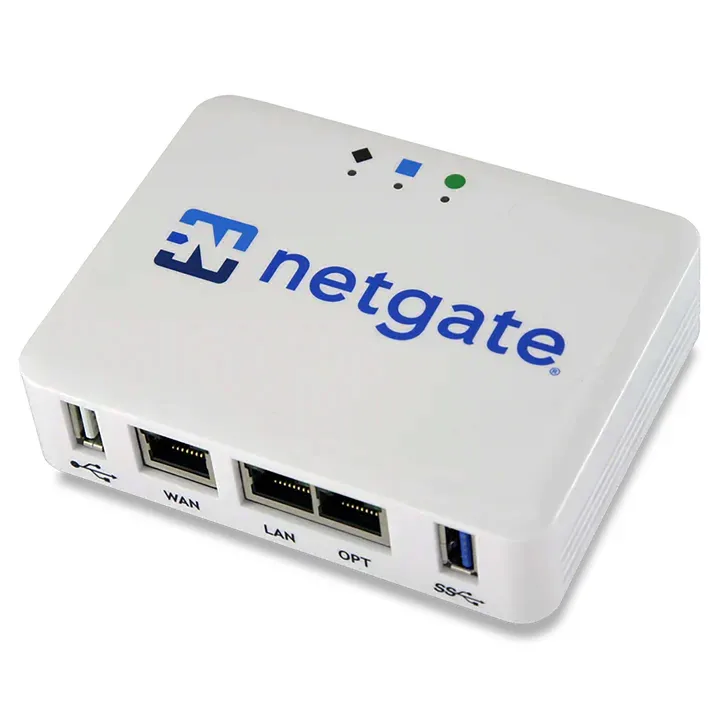 NetgateNetgate 1100 pfSense+ Security Gateway
 Grandstream NetworksGrandstream Networks GWN7660E Wi-Fi 6 Access Point
/product-images/2260e-20250609-111434.png) Ruijie ReeyeRuijie Reeye RG-RAP2260(G) Wi-Fi 6 Access Point
Ruijie ReeyeRuijie Reeye RG-RAP2260(G) Wi-Fi 6 Access Point FortinetFortiGate 30G Next-Generation Firewall
How a network job runs
- 1Message or call with the site, the number of users and what is slow, down or missing.
- 2A technician visits, surveys the site and the existing network, and takes measurements.
- 3A written design and quote: the equipment, the IP and VLAN plan, the Wi-Fi plan and the work.
- 4Installation and cabling, then configuration of switching, routing, firewall and Wi-Fi.
- 5Testing: throughput, roaming, failover, VLAN isolation and VPN, with your staff present.
- 6Handover with the network diagram, IP and VLAN plan, firewall rule list and credentials.
- 7Ongoing support or a maintenance arrangement after handover, if the client wants it.
What decides the quote
- The number of users and devices, now and planned
- The area and construction of the building (floors, walls, open halls)
- The number of switches, access points and cabling points
- Internet links and bandwidth, and whether a backup link is needed
- Redundancy and uptime the business requires
- Security and compliance requirements
- Existing equipment that can be reused
- The number of sites and how they connect
Every business job is designed to the site and quoted in writing after the visit.
Networking terms explained
- VLAN
- A separate logical network on shared switches, used to keep groups of devices apart, such as staff, guests and cameras.
- 802.1Q trunk
- A link that carries several VLANs between switches, firewalls and access points, with each frame tagged.
- Spanning tree (STP, RSTP)
- A protocol that prevents switching loops by blocking redundant paths until they are needed.
- LACP (link aggregation)
- Combines several physical links into one logical link for more bandwidth and redundancy.
- OSPF
- A link-state routing protocol used inside a company network to learn routes and reroute around failures.
- BGP
- The routing protocol of the internet, used to connect to ISPs and exchange routes between networks and sites.
- VRRP
- A protocol that lets two devices share one gateway address so a failure causes no outage.
- NAT
- Translating private addresses to public ones so many devices share an internet connection and servers can be published.
- IPsec VPN
- An encrypted tunnel between two sites or between a user and the company network.
- SD-WAN
- A way to steer traffic over the best of several links, managed centrally.
- QoS and DSCP
- Marking and prioritising traffic so voice and video are not delayed by bulk transfers.
- PoE (power over Ethernet)
- Power delivered over the network cable to phones, access points and cameras.
- SSID
- The name of a Wi-Fi network. One access point can broadcast several SSIDs, each mapped to its own VLAN.
- 802.1X and RADIUS
- A sign-in method where each user or device authenticates against a central server before getting network access.
- WPA3
- The current Wi-Fi security standard, with stronger protection than WPA2.
- Client isolation
- A Wi-Fi setting that stops connected devices from reaching each other, used on guest networks.
- DHCP snooping
- A switch feature that blocks rogue DHCP servers and records legitimate address assignments.
- DMZ
- A separate network zone for servers that must be reachable from the internet, kept apart from the internal network.
- SNMP and NetFlow
- Protocols that let monitoring tools read device health and traffic statistics.
Technicians and engineers
Your network is looked after by UltraTech's field technicians and engineers: Pakistani and Indian technicians, led by an engineer with 13+ years of experience in Kuwait. The team works in Arabic, English and Hindi.
Areas we cover
The technicians cover all six governorates of Kuwait, from Kuwait City and Salmiya to Fahaheel, Mangaf, Jahra and Sabah Al-Salem. The visit is booked for the address of your site.
- Capital (Al Asimah)
- Hawalli
- Farwaniya
- Mubarak Al-Kabeer
- Ahmadi
- Jahra
In short
- UltraTech Kuwait's technicians install, configure and repair business networks: enterprise switching, enterprise Wi-Fi, firewalls and VPN, VLANs, OSPF and BGP routing, and internet and WAN links.
- They work as systems integrators, so the network is configured to the client's requirement and works with phones, cameras, access control and servers.
- They segment and isolate networks with VLANs, firewall zones and client isolation, and build in redundancy and failover.
- They offer network assessments, platform configuration (Ubiquiti, TP-Link Omada, Ruijie, Cisco, Aruba, Fortinet, MikroTik, pfSense and more) and managed support.
- They provide advanced configuration (QoS, 802.1X, spanning tree, LACP, DHCP snooping, monitoring, backups) and integrate the network with IP phones, CCTV, access control, servers, cloud and sign-in systems.
- UltraTech is an official integrator for many of the enterprise brands used in Kuwait, among them Cisco, Juniper, Aruba, Fortinet, Palo Alto, Huawei, Ubiquiti, MikroTik, TP-Link Omada and Ruijie.
- Every job starts with a site visit, is quoted in writing, and ends with tested handover and documentation.
- The team is Pakistani and Indian technicians and engineers, led by an engineer with 13+ years in Kuwait, working in Arabic, English and Hindi.