Network design & architecture
UltraTech Kuwait designs business network architectures in Kuwait: a documented plan covering the network layout, VLANs and addressing, Wi-Fi coverage, security zones and room to grow. You receive a design and bill of materials before any equipment is bought, which you can build with us or tender elsewhere.
Reviewed by Eng. M. Ahmed, Project Manager, IT Operations · Updated
Book a site visit
20 KWDDeducted from your invoice when you go ahead
An engineer visits for network design & architecture, Sunday – Thursday, 9:30 am – 6 pm.
Book a visitor get a quote without a visit →At a glance
- Where
- All six governorates of Kuwait
- Site visit
- 20 KWD, deducted from your invoice
- Response
- Within 4 hours (SLA)
- You receive
- Drawings, VLAN and IP plan, Wi-Fi plan, security zones, bill of materials
- Brand
- Vendor-neutral: options across brands
- Use it for
- Building with us, a tender, or your own IT team
More in Network Design & Installation
How much does a network design cost in Kuwait?
Typical Kuwait prices in 2026, equipment and installation included. Your exact price is fixed in writing after the site visit (20 KWD, deducted from your invoice when you go ahead).
| Small office design (one floor, up to ~25 users) | 150 – 350 KWD |
| Growing office or full floor (25–80 users) | 350 – 900 KWD |
| Multi-floor HQ or multi-branch network | 900 – 2,500 KWD |
| Tender pack: specifications and bill of quantities | from 300 KWD |
| Review of another installer's design or build | 150 – 500 KWD |
What moves the price
- Number of sites, floors and users
- How much must stay online if something fails
- Security and compliance requirements
- Whether you need a tender-ready specification
What does a network design cover for your size of company?
What each design includes and how long it takes, from the first meeting to the final documents.
| Project | Users | Main decisions | Documents | Time |
|---|---|---|---|---|
| Small office | Up to 25 | Firewall, one switch stack, Wi-Fi, VLANs | Topology, IP plan, bill of materials | 3–5 days |
| Growing office / floor | 25–80 | Switch sizing, Wi-Fi capacity, guest and voice networks | Plus Wi-Fi plan and rack layout | 1–2 weeks |
| Multi-floor HQ | 80–300 | Core and distribution, redundancy, server room | Plus redundancy and cabling design | 2–4 weeks |
| Multi-branch | Several sites | Branch links, SD-WAN or VPN, central security | Plus a standard branch template | 3–6 weeks |
What to prepare before a network design
The answers that shape the design. We collect them in the first meeting; having them ready saves a week.
People and sites
- Number of staff today and in 3 years
- Sites, floors and buildings to connect
- Who works remotely, and from where
Applications
- Cloud services (Microsoft 365, ERP, POS)
- Servers or storage kept on site
- Phones, cameras and access control on the network
Availability
- What must keep working if a line or switch fails
- Opening hours and allowed downtime
- Internet lines and providers in use
Rules and budget
- Security or audit requirements (banks, health, government)
- Preferred or excluded brands
- Budget range and timeline
How long does a network design take?
A small office design takes a few days; a headquarters or multi-branch design about three to four weeks.
- 1
Discovery
Days 1–3
Site visit, interviews and a survey of what exists today.
- 2
High-level design
Week 1–2
Architecture and options, reviewed with you.
- 3
Review
Week 2
Choices agreed: brands, redundancy, budget.
- 4
Low-level design and BOQ
Week 2–3
Every port, VLAN and address; final quantities.
- 5
Handover
Week 3–4
Documents delivered and walked through; tender specs if needed.
Is the design tied to one brand?
No. The design says what each part must do; for each, we give options you can compare on price. These are the platforms we usually recommend.
| Brand | Best for | Why | Cost |
|---|---|---|---|
| Ubiquiti UniFi | Small and growing offices | One app for switches, Wi-Fi and firewall; no licence fees | $$ |
| TP-Link Omada | Budget-conscious small offices | Cloud or local controller; lowest cost per port | $ |
| Ruijie Reyee | Small offices, shops, clinics | Free cloud app; strong Wi-Fi 6 and Wi-Fi 7 range | $ |
| Aruba (HPE) | Growing to enterprise offices | Instant On for small sites; CX switching and Central for larger ones | $$$ |
| Cisco | Enterprise and regulated sectors | Industry standard, long support life, most IT teams know it | $$$$ |
| MikroTik | Routing-heavy or multi-site setups | Very flexible and low cost; needs an engineer to manage | $ |
What people ask before they hire
How much does a network design cost in Kuwait?
Typically 150–350 KWD for a small office, 350–900 KWD for a growing office or full floor, and 900–2,500 KWD for a multi-floor HQ or multi-branch network. The fee is agreed in writing before work starts.
Why pay for a design before buying equipment?
Because most network problems are design problems: a flat network with no separation, no redundancy at the core, or Wi-Fi sized for coverage instead of the number of users. A design fixes them on paper, where it costs least.
Can we use your design with another installer?
Yes. The design and bill of materials are yours. We can also review the installer's work against the design.
Is the design tied to one brand?
No. We describe what each part must do and suggest options across brands, so you can compare prices.
Can you prepare a tender specification?
Yes. We write the technical specification and bill of quantities so every bidder prices the same thing, and we can help evaluate the offers.
What does a design include for a multi-branch company?
How branches connect to each other and to head office, central firewall and internet, and a standard layout each branch can copy.
How long does a network design take?
3–5 days for a small office, 1–2 weeks for a full floor, and 2–6 weeks for a headquarters or multi-branch network, including your review.
Can you write the technical specification for a government or company tender?
Yes. We write brand-neutral technical specifications and a BOQ for your tender or RFQ, so bidders price the same thing. Government tenders in Kuwait run through the Central Agency for Public Tenders (CAPT), and bidders must meet its registration rules.
Will the design work with our cloud services?
Yes. Microsoft 365, cloud ERP and POS systems are planned into the internet edge, firewall and backup line, so they keep working if one line fails.
Do you design networks that already exist?
Yes. We document what you have, find the weak points and design the target network, then plan how to move to it without downtime.
Design mistakes we find in Kuwait company networks
What our engineers see when they review networks that grew without a plan.
01One flat network for everything
Our fix: Staff, guests, cameras and phones share one network, so one infected laptop reaches everything. We separate them with VLANs and firewall rules.
02A single core switch with no backup
Our fix: When it fails the whole office stops. We design a redundant core or at least a tested spare and failover plan.
03Wi-Fi sized for coverage, not users
Our fix: It works when the office is empty and fails in meetings. We size access points for the number of people and devices.
04No room to grow
Our fix: Switches and racks full from day one. We plan spare ports, rack space and cabling for the next two years.
05Tender specifications copied from a brochure
Our fix: They lock you to one brand or leave gaps. We write specifications that describe what is needed, not a model number.
What do you get at handover?
Requirements summary
Users, sites, applications and what must never go down.
Topology drawings
Core, distribution and access layers, as PDF and editable files.
VLAN and IP plan
Every network, its purpose and its address range.
Wi-Fi plan
Access point positions and capacity for your floor plans.
Security design
Firewall zones, remote access and what can talk to what.
Bill of materials
Equipment options across brands, ready to buy or tender.
What do you receive from a network design?
Every document is yours. Use it to buy equipment, brief an installer or issue a tender.
| Document | What it is for | When |
|---|---|---|
| High-level design (HLD) | Architecture, sites, redundancy, internet and security edge, in plain diagrams | Week 1–2 |
| Low-level design (LLD) | Every switch, port, VLAN, IP range, routing and Wi-Fi setting | Week 2–3 |
| Bill of quantities (BOQ) | Exact models and quantities, with two or three budget options | With the LLD |
| IP addressing and VLAN plan | Address ranges, naming and which device goes where | With the LLD |
| Rack elevations and cabling plan | What goes in each rack, and every point on the floor plans | With the LLD |
| Security policy | Firewall rules, remote access, guest and device separation | With the LLD |
| Migration plan | How to move from the current network without downtime | If replacing a network |
| Tender specification | Brand-neutral technical specs and BOQ for your tender or RFQ | On request |
How does it work?
- Step 1
Discovery
Meetings and a site visit to understand how you work.
- Step 2
Draft design
Topology, IP plan and equipment options for your review.
- Step 3
Final design
Updated after your feedback, with drawings and bill of materials.
- Step 4
Build (optional)
We install it, or support and check your chosen installer.
Our recent network work in Kuwait
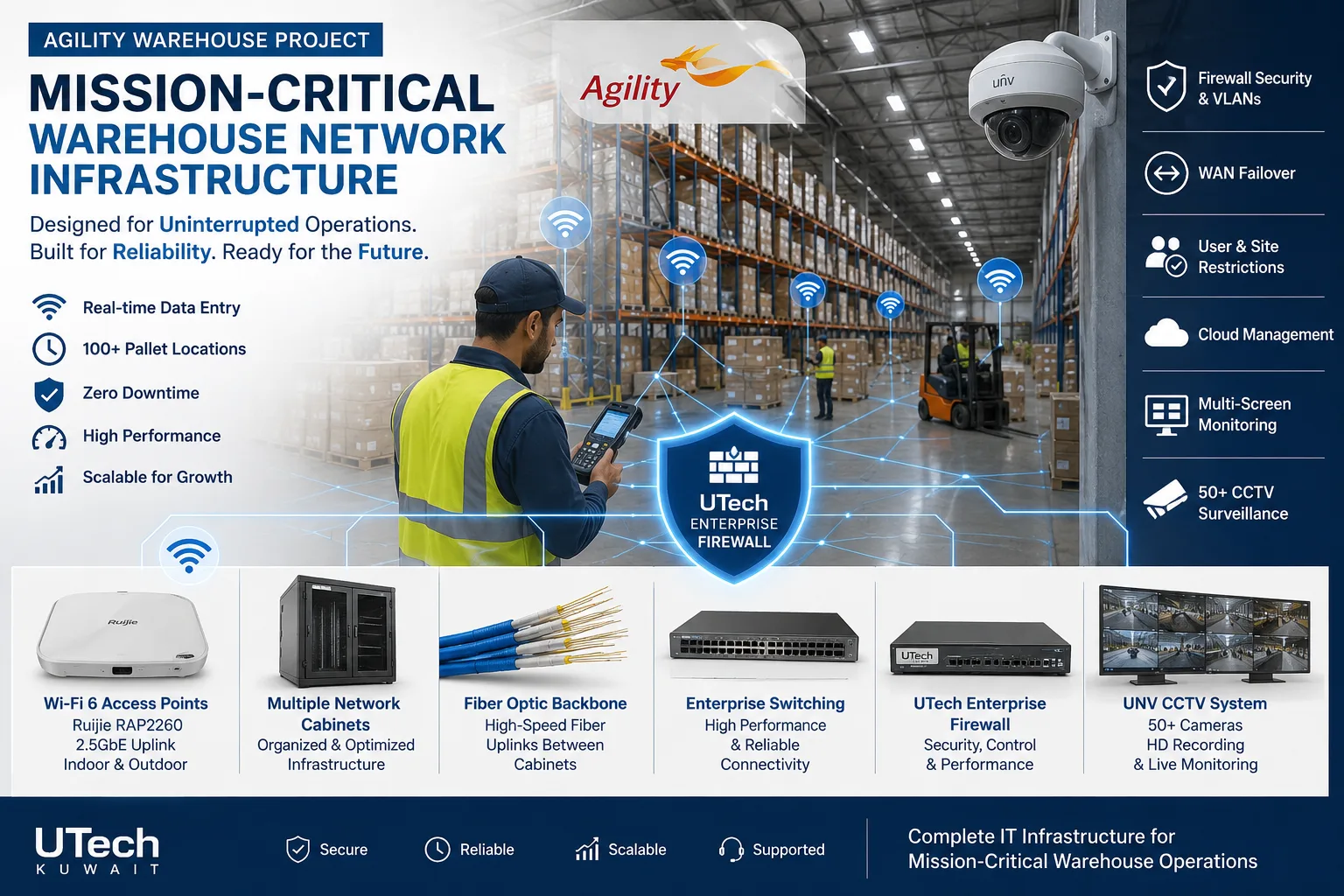 Mission-critical warehouse networkEnterprise Wi-Fi and switching for a major logistics operator's warehouse in Kuwait.Read the case study →
 Multi-floor commercial Wi-Fi upgradeEnterprise Wi-Fi rebuilt across every floor of a commercial facility.Read the case study →
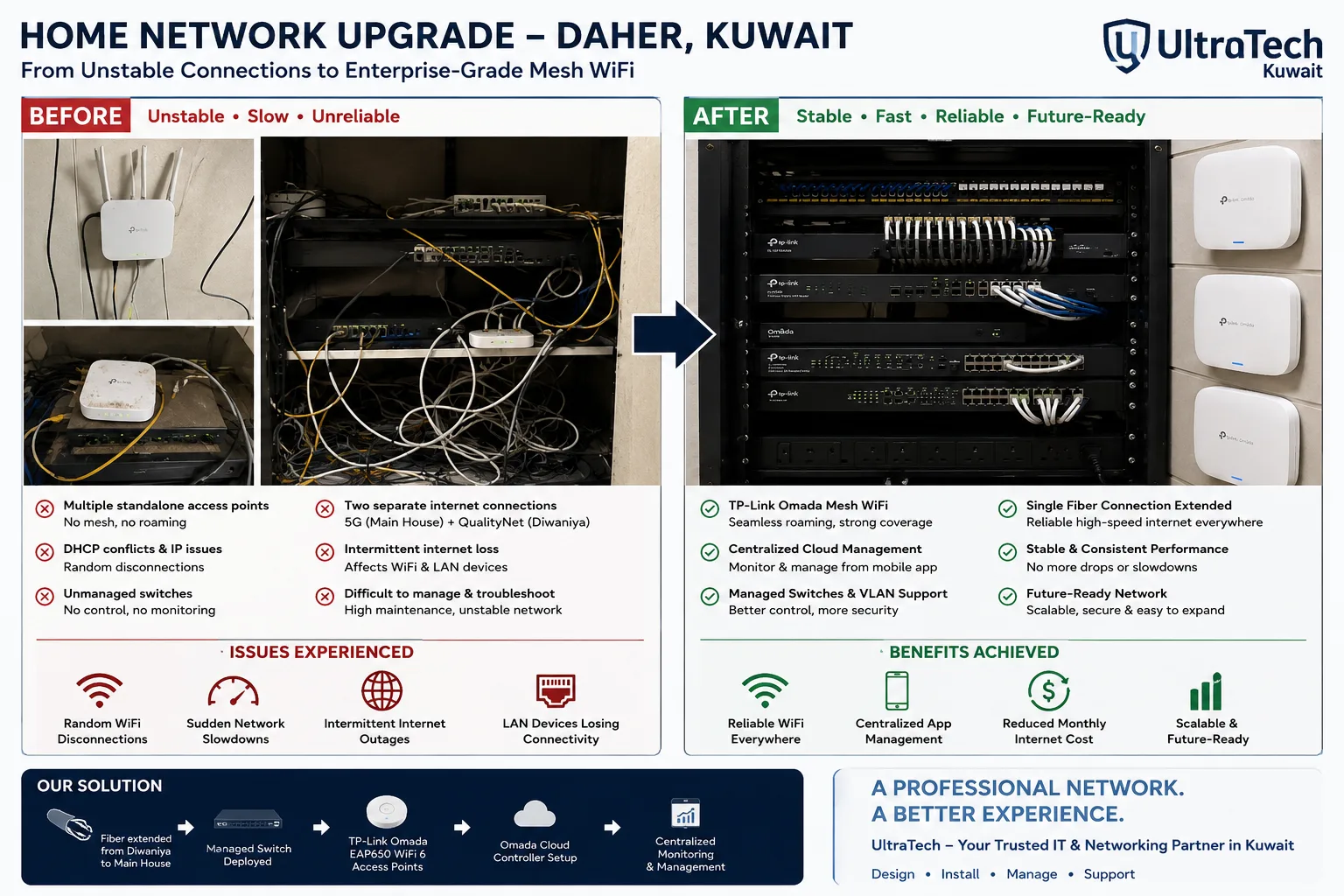 Two-building Omada mesh network, Daher7–8 unstable access points replaced by one managed Omada network across two buildings.Read the case study →
Who does the work
The delivery team behind every project, from our team page.
What layers does a business network design define?
The structure every design documents, from the internet edge to the devices.
- 01Internet and WAN links
- 02Firewall and security zones
- 03Core switching
- 04Distribution per floor or building
- 05Access switches
- 06Wi-Fi and devices
Standards and specifications
Structure
Hierarchical core, distribution and access, sized to the site.
Redundancy
Dual uplinks and core failover where downtime is not acceptable.
Segmentation
VLANs per role: staff, guests, voice, cameras, servers, management.
Addressing
A documented IP scheme that leaves room for growth.
Voice and video
Quality-of-service rules so calls and meetings stay clear.
Documents
PDF for reading, editable files for your IT team.
Which equipment do we install?
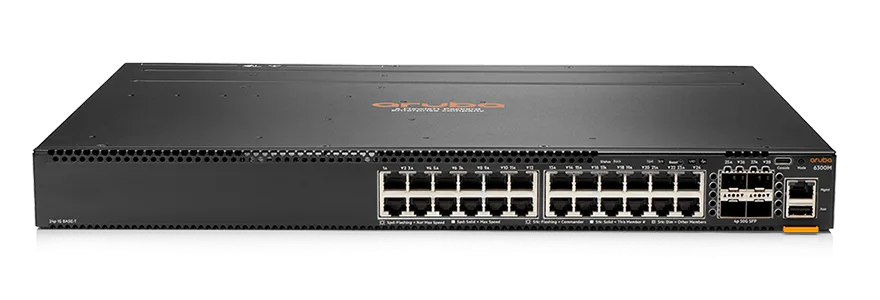 Aruba CX 6300 24-Port SFP+ SwitchAruba Networks · Aruba Network SwitchesWe supply and install →
 Cisco Catalyst 9300 SwitchCisco Systems · Cisco Network SwitchesWe supply and install →
 FortiGate 201F Next-Generation FirewallFortinet · Next-Generation Firewall (NGFW)We supply and install →
 Ruijie Reeye Layer 3 Chassis Cloud-Managed SwitchRuijie Reeye · Layer 3 Managed SwitchesWe supply and install →
Network design terms, explained
- HLD (high-level design)
- The architecture on one page: sites, core, internet edge, redundancy and how traffic flows.
- LLD (low-level design)
- The build sheet: every device, port, VLAN, IP range and setting an installer configures.
- BOQ (bill of quantities)
- The exact list of equipment and quantities to buy or to price in a tender.
- Core, distribution and access
- The three layers of a business network: the central switches, the floor or building aggregation, and the switches desks plug into.
- Layer 3 switch
- A switch that also routes between VLANs, so traffic between departments stays fast and inside the building.
- Redundancy
- A second path or device that takes over automatically when the first fails.
- SD-WAN
- Software-managed links between branches over ordinary internet lines, with automatic failover.
- NAC
- Network access control: only known, approved devices are allowed onto the network.
- QoS
- Quality of service: voice and video get priority over downloads, so calls stay clear.
Keep exploring
Book a site visit and get a written quote
20 KWD, deducted from your invoice when you go ahead. We reply within working hours.